- Mitglied seit
- 7 Apr 2010
- Beiträge
- 3
- Punkte für Reaktionen
- 0
- Punkte
- 0
Hi!
Ich nutze die Fritz!Box 7270 (Internat. Version) und probiere, neben Inode auch noch Sipgate.at auf der FB zum Laufen zu überreden.
Ich habe die dtmfbox erfolgreich installiert und über das Webinterface den Sipgate acc. nach Anleitung konfiguriert. Im sipgate.at Menü wird das Gerät auch erfolgreich als "online" angezeigt, das Webinterface des dtmfbox zeigt auch "online" an, eine Verbindung sollte also stehen.
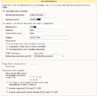
Im Fritz!Box Webinterface habe ich den Server geändert, siehe screenshot.
Sobald ich mich von meinem Handy aus Anrufe kommt "der gewünschte anschluss ist derzeit nicht erreichbar" , das MT-F läutet auch nicht. Im LogFile steht folgendes:
Der Sipgate account wurde bereits vor einem Monat erstellt, die Fritz!Box ist auch schon seit über 24 Stunden mit Sipgate verbunden..der Anschluss sollte also stehen.
Wenn ich mit dem MT-F probiere, jemanden anzurufen,kommt kein Freizeichen sondern das normale tut-tut-tut :spocht:
Der Logeintrag, wenn ich jemanden anrufe:
Hier wollte ich die Nummer 10000 anrufen (gratis testnummer von sipgate), auch mein Mobiltelefon funktioniert nicht.
Genutzt wird - wie geschrieben - ein Sipgate.at Account, Eine Fritzbox 7270 Internat. Version (dh. mit annex a & b), MT-F Telefon und die v0.5.0 dtmfbox USB Installation. In der FB wird die Nummer übrigens erfolgreich als registriert angezeigt.
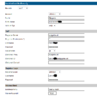
Meine Konfiguration als Screeny findet ihr im Anhang.
Liebe Grüße und Danke für eure Zeit,
Huggy
Ich nutze die Fritz!Box 7270 (Internat. Version) und probiere, neben Inode auch noch Sipgate.at auf der FB zum Laufen zu überreden.
Ich habe die dtmfbox erfolgreich installiert und über das Webinterface den Sipgate acc. nach Anleitung konfiguriert. Im sipgate.at Menü wird das Gerät auch erfolgreich als "online" angezeigt, das Webinterface des dtmfbox zeigt auch "online" an, eine Verbindung sollte also stehen.
Im Fritz!Box Webinterface habe ich den Server geändert, siehe screenshot.
Sobald ich mich von meinem Handy aus Anrufe kommt "der gewünschte anschluss ist derzeit nicht erreichbar" , das MT-F läutet auch nicht. Im LogFile steht folgendes:
Code:
 16:21:25   voip_funcs.c Request 4 unsupported!
 16:21:25    voip_auth.c Found credentials -> user: 5978028, realm: fritz.box
 16:21:25    voip_auth.c DIGEST=HEADER e1005354168a18ed9ec1f6674de9e35f=e1005354168a18ed9ec1f6674de9e35f
 16:21:25 voip_registrar Status: 200 (OK)
 16:23:12      dtmfbox.c Successfully sent keep-alive (sipgate.at)
 16:23:58  voip_events.c RX-REQUEST 1316 bytes Request msg INVITE/cseq=102 (rdata0x52278c) from UDP 217.10.79.13:5060
 16:23:58  voip_events.c

INVITE sip:[email protected]:5061;transport=UDP SIP/2.0
Record-Route: <sip:217.10.79.13;lr=on;ftag=as4e9609d7>
Record-Route: <sip:172.20.40.3;lr=on>
Record-Route: <sip:217.10.79.13;lr=on;ftag=as4e9609d7>
Via: SIP/2.0/UDP 217.10.79.13:5060;branch=z9hG4bK7a2b.e23923c4.0
Via: SIP/2.0/UDP 172.20.40.3;branch=z9hG4bK7a2b.e23923c4.0
Via: SIP/2.0/UDP 217.10.79.13:5060;received=217.10.68.226;branch=z9hG4bK0a945a29
Via: SIP/2.0/UDP 217.10.66.71:5060;branch=z9hG4bK0a945a29;rport=5060
From: "meinhandy" <sip:[email protected]>;tag=as4e9609d7
To: <sip:[email protected]>
Contact: <sip:[email protected]>
Call-ID: [email protected]
CSeq: 102 INVITE
Max-Forwards: 67
Allow: INVITE, ACK, CANCEL, OPTIONS, BYE, REFER, SUBSCRIBE, NOTIFY
Supported: replaces
Content-Type: application/sdp
Content-Length: 448

v=0
o=root 15933 15933 IN IP4 217.10.66.71
s=session
c=IN IP4 217.10.77.16
t=0 0
m=audio 58400 RTP/AVP 8 0 3 97 18 112 101
a=rtpmap:8 PCMA/8000
a=rtpmap:0 PCMU/8000
a=rtpmap:3 GSM/8000
a=rtpmap:97 iLBC/8000
a=fmtp:97 mode=30
a=rtpmap:18 G729/8000
a=fmtp:18 annexb=no
a=rtpmap:112 G726-32/8000
a=rtpmap:101 telephone-event/8000
a=fmtp:101 0-16
a=silenceSupp:off - - - -
a=ptime:20
a=sendrecv
a=direction:active
a=nortpproxy:yes


 16:23:58   voip_funcs.c Incoming call from sip:[email protected] to sip:[email protected] [account #2128606152]
 16:23:58   voip_funcs.c Incoming call from sip:[email protected] to sip:[email protected] [account #2128605056]
 16:23:58   voip_funcs.c Incoming call from sip:[email protected] to sip:[email protected] [account #2128603952]
 16:23:58   voip_funcs.c Create UAS dialog ...
 16:23:58   voip_funcs.c Create media capability ...
 16:23:58   voip_funcs.c Create invite session ...
 16:23:58   voip_funcs.c Respond 100 ...
 16:23:58  voip_events.c [type=voip/inc conid=0 accid=1] Call state changed to INCOMING
 16:23:58   voip_funcs.c Respond 180 (*ring*)..
 16:23:58  voip_events.c [type=voip/inc conid=0 accid=1] Call EARLY (reason=0, Default status message)
 16:23:58 voip_registrar Make VoIP call by client (<sip:[email protected]:5061> -> <sip:[email protected]:5060>) ...
 16:23:58   voip_funcs.c Initialize outgoing call from '<sip:[email protected]:5061>' to '<sip:[email protected]:5060>'
 16:23:58   voip_funcs.c Create SDP ...
 16:23:58   voip_funcs.c Create invite session ...
 16:23:58  voip_events.c [type=voip/out conid=1 accid=1] Call state changed to CALLING
 16:23:58  voip_events.c [type=voip/out conid=1 accid=1] Call DISCONNECTED (reason=404, Not Found)
 16:23:58  voip_events.c [type=voip/inc conid=0 accid=1] Call DISCONNECTED (reason=603, Decline)
 16:23:58 voip_registrar VoIP client disconnected [0]
 16:23:58      plugins.c [plugin.menu] Action: script:action_wrapper (acc=1 con=0)
 16:23:58      plugins.c [plugin.menu] Script: /var/dtmfbox/script/action.sh(/var/dtmfbox/script/action.sh, "CONNECT", "VOIP", "INCOMING", "0", "-1", "43720978028", "[email protected]", "1", "", "") (acc=1 con=0)
 16:23:58      plugins.c [plugin.menu] Action: script:action_wrapper (acc=1 con=1)
 16:23:58      plugins.c [plugin.menu] Script: /var/dtmfbox/script/action.sh(/var/dtmfbox/script/action.sh, "CONNECT", "USER", "INCOMING", "1", "0", "43720978028", "[email protected]:5060", "1", "", "") (acc=1 con=1)
 16:23:58      plugins.c [plugin.menu] Action: script:action_wrapper (acc=1 con=0)
 16:23:58      plugins.c [plugin.menu] Script: /var/dtmfbox/script/action.sh(/var/dtmfbox/script/action.sh, "DISCONNECT", "VOIP", "INCOMING", "0", "-1", "43720978028", "[email protected]", "1", "", "0") (acc=1 con=0)
 16:23:58      plugins.c [plugin.menu] Action: script:action_wrapper (acc=1 con=1)
 16:23:58      plugins.c [plugin.menu] Script: /var/dtmfbox/script/action.sh(/var/dtmfbox/script/action.sh, "DISCONNECT", "USER", "INCOMING", "1", "-1", "43720978028", "[email protected]:5060", "1", "", "404") (acc=1 con=1)
Der Sipgate account wurde bereits vor einem Monat erstellt, die Fritz!Box ist auch schon seit über 24 Stunden mit Sipgate verbunden..der Anschluss sollte also stehen.
Wenn ich mit dem MT-F probiere, jemanden anzurufen,kommt kein Freizeichen sondern das normale tut-tut-tut :spocht:
Der Logeintrag, wenn ich jemanden anrufe:
Code:
INVITE sip:[email protected]:5061 SIP/2.0
Via: SIP/2.0/UDP 127.0.0.1:5060;rport;branch=z9hG4bK50374988376E5FE1
From: <sip:[email protected]>;tag=836A4D665823E348
To: <sip:[email protected]:5061>
Call-ID: [email protected]
CSeq: 9 INVITE
Contact: <sip:[email protected];uniq=6C8654B233978B5C17B0630CA850B>
Max-Forwards: 70
Expires: 120
User-Agent: AVM FRITZ!Box Fon WLAN 7270 54.04.81 TAL (Feb 19 2010)
Supported: 100rel,replaces
Allow-Events: telephone-event,refer
Allow: INVITE,ACK,OPTIONS,CANCEL,BYE,UPDATE,PRACK,INFO,SUBSCRIBE,NOTIFY,REFER,MESSAGE,PUBLISH
Content-Type: application/sdp
Accept: application/sdp, multipart/mixed
Accept-Encoding: identity
Content-Length:   435

v=0
o=user 8263704 8263704 IN IP4 127.0.0.1
s=call
c=IN IP4 127.0.0.1
t=0 0
m=audio 7078 RTP/AVP 9 8 0 2 102 100 99 97 18 120 121 101
a=sendrecv
a=rtpmap:2 G726-32/8000
a=rtpmap:102 G726-32/8000
a=rtpmap:100 G726-40/8000
a=rtpmap:99 G726-24/8000
a=rtpmap:97 iLBC/8000
a=fmtp:97 mode=30
a=fmtp:18 annexb=no
a=rtpmap:120 PCMA/16000
a=rtpmap:121 PCMU/16000
a=rtpmap:101 telephone-event/8000
a=fmtp:101 0-11
a=rtcp:7079


 16:42:39   voip_funcs.c Unauthorized client request!
 16:42:39   voip_funcs.c Unauthorized client request!
Hier wollte ich die Nummer 10000 anrufen (gratis testnummer von sipgate), auch mein Mobiltelefon funktioniert nicht.
Genutzt wird - wie geschrieben - ein Sipgate.at Account, Eine Fritzbox 7270 Internat. Version (dh. mit annex a & b), MT-F Telefon und die v0.5.0 dtmfbox USB Installation. In der FB wird die Nummer übrigens erfolgreich als registriert angezeigt.
Meine Konfiguration als Screeny findet ihr im Anhang.
Liebe Grüße und Danke für eure Zeit,
Huggy