


- Mitglied seit
- 4 Apr 2006
- Beiträge
- 11
- Punkte für Reaktionen
- 0
- Punkte
- 0
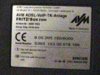
I have been following the "FRITZ!Box Fon: Modifikationen" post for a while and i believe i could find a little help in a problem.Because i don't speak German i have done a failed attempt to upgrade the fritz box fon (product code 01036,i can upload to this post a photo of its back plate if this could be useful to someone trying to help me resolve the problem) firmware from German to English (fritz.box_fon.en.06.04.01.image) and afterwards i discovered this forum and all the help can find in it.During upgrade the INFO led turned on for a while.Afterwards and while the INFO led was still on there was a message in German that couldn't understand a word of it but seem to have two options,propably PROCEED and CANCEL or something like this.I checked the left one and then happened something i thought was modem reboot : all the fritz leds went on and then off and after that only the power led went on but this time was blinking.I tried to reboot my pc but there was no difference.From this time i have lost communication with the fritz box through the web interface.I managed to connect via telnet and 192.168.178.1 and this is what i get:
I only have USB connection not LAN with the modem .I have already activated telnet through #96*7* and have done what OPENSOFT posted (on 04.03.2006, 17:26 Converting a German targeted Fritz!Box Fon Wlan to an International version) but i am doing something wrong from the part he says "Untar the firmware in a directory, i.e. patch:
mkdir patch
cd patch
tar xvf ../firmware.image
you get a ./var directory containing, among other stuff, a script called "install"
edit the script:
vi ./var/install"
and i couldn't edit the script.I also tried to do it with cygwin but also failed.I am still reading posts in this site in order to find a solution but most of them are in German and is time consuming to translate them even through online translation engines.I believe telnet is the way to "roll back'' firmware in a way we "roll back" drivers in a windows enviroment a but can't make the damn thing cooperate.I still haven't got any reply from AVM support.SO THE CRUCIAL QUESTION IS HOW CAN I GET BACK WEB INTERFACE CONNECTION WITH THE FBF EVEN IF THIS MEANS I HAVE TO KEEP THE GERMAN INTERFACE I HAD BEFORE THE FAILED FIRMWARE UPDATE?Much obliged folks for your time and interest.Special thanks to DARBID ,TELEFONICUS and VOIPMUSTBE for their support.Also many thanks to site ADMIN and MODERATORS for their fabulous work.
-----
Edit Novize
Please do not use the "Quote-Tags"
for posting your log, use the "Code-Tags"
Thanks
-----
Code:
2002-09-08 15:01:24 unknown: /var/flash/ar7.cfg:9: member dhcpenabled not found
in ST_topsection ar7cfg
2002-09-08 15:01:24 unknown: /var/flash/ar7.cfg:9: member dhcpenabled not in ar7
cfg, try to recover
2002-09-08 15:01:24 unknown: load_config(ar7): warning: converted


Code:
BusyBox v1.00-pre3 (2005.11.04-09:38+0000) Built-in shell (ash)
Enter 'help' for a list of built-in commands.

HWRevision='58'
HWSubRevision=''
ANNEX='B'
ANNEX_PTEST_FILE='ptest-results-0'
ANNEX_PTEST_HOST='192.168.178.20'
ANNEX_TEST='0'
OEM='1und1'
Language='en'
Country='99'
TZ='CET-1CEST,M3.5.0,M10.5.0'
CONFIG_AB_COUNT='2'
CONFIG_ANNEX='B'
CONFIG_ANSWER='n'
CONFIG_ASSIST='y'
CONFIG_ATA='y'
CONFIG_ATA_FULL='n'
CONFIG_AUDIO='n'
CONFIG_AURA='n'
CONFIG_BLUETOOTH='n'
CONFIG_BLUETOOTH_CTP='n'
CONFIG_BUTTON='n'
CONFIG_CAPI='y'
CONFIG_CAPI_MIPS='y'
CONFIG_CAPI_UBIK='n'
CONFIG_CAPI_XILINX='n'
CONFIG_CDROM='y'
CONFIG_CDROM_FALLBACK='y'
CONFIG_DECT='n'
CONFIG_DSL='y'
CONFIG_ENVIRONMENT_PATH='/proc/sys/dev/adam2'
CONFIG_ETH_COUNT='1'
  CONFIG_FIRMWARE_URL='[URL="http://www.avm.de/fritzbox-firmware-...p?hardware=58&"]http://www.avm.de/fritzbox-firmware-...p?hardware=58&[/URL]
oem=1und1&language=en&country='
CONFIG_FON='y'
CONFIG_HOMEI2C='n'
CONFIG_HOSTNAME='fritz.fon.box'
CONFIG_I2C='n'
CONFIG_INSTALL_TYPE='ar7_4MB_2eth_2ab_isdn_pots_05804'
CONFIG_JFFS2='n'
CONFIG_LED_NO_DSL_LED='n'
CONFIG_MEDIACLI='n'
CONFIG_MEDIASRV='n'
CONFIG_NAND='n'
CONFIG_NFS='n'
CONFIG_OEM_DEFAULT='freenet'
CONFIG_PRODUKT='Fritz_Box_FON'
CONFIG_PRODUKT_NAME='FRITZ!Box Fon (UI)'
CONFIG_RAMSIZE='16'
CONFIG_ROMSIZE='4'
  CONFIG_SERVICEPORTAL_URL='[URL="http://www.avm.de/fritzbox-service-portal.php?hardware"]http://www.avm.de/fritzbox-service-portal.php?hardware[/URL]
=58&oem=1und1&language=en&country='
CONFIG_STOREUSRCFG='y'
CONFIG_SUBVERSION=''
CONFIG_UBIK2='n'
CONFIG_USB='y'
CONFIG_USB_HOST_AVM='n'
CONFIG_USB_HOST_TI='n'
CONFIG_USB_PRINT_SERV='n'
CONFIG_USB_STORAGE='n'
CONFIG_USB_WLAN_AUTH='n'
CONFIG_VERSION='04.01'
CONFIG_VERSION_MAJOR='06'
CONFIG_VLYNQ0='0'
CONFIG_VLYNQ1='0'
CONFIG_VPN='n'
CONFIG_WLAN='n'
CONFIG_WLAN_GREEN='n'
CONFIG_WLAN_WDS='n'
CONFIG_XILINX='n'
ermittle die aktuelle TTY
tty is "/dev/pts/0"
Console Ausgaben auf dieses Terminal umgelenkt
# Sep  8 15:02:07 multid[337]: 0.0.0.0:2049: failed to send UDP-datagram to 192.
168.180.1:53 - Network is unreachable (128)
Sep  8 15:02:08 multid[337]: 0.0.0.0:2049: failed to send UDP-datagram to 192.16
8.180.1:53 - Network is unreachable (128)
Sep  8 15:02:08 multid[337]: 0.0.0.0:2049: failed to send UDP-datagram to 192.16
8.180.2:53 - Network is unreachable (128)mkdir patch
cd patch
tar xvf ../firmware.image
you get a ./var directory containing, among other stuff, a script called "install"
edit the script:
vi ./var/install"
and i couldn't edit the script.I also tried to do it with cygwin but also failed.I am still reading posts in this site in order to find a solution but most of them are in German and is time consuming to translate them even through online translation engines.I believe telnet is the way to "roll back'' firmware in a way we "roll back" drivers in a windows enviroment a but can't make the damn thing cooperate.I still haven't got any reply from AVM support.SO THE CRUCIAL QUESTION IS HOW CAN I GET BACK WEB INTERFACE CONNECTION WITH THE FBF EVEN IF THIS MEANS I HAVE TO KEEP THE GERMAN INTERFACE I HAD BEFORE THE FAILED FIRMWARE UPDATE?Much obliged folks for your time and interest.Special thanks to DARBID ,TELEFONICUS and VOIPMUSTBE for their support.Also many thanks to site ADMIN and MODERATORS for their fabulous work.
-----
Edit Novize
Please do not use the "Quote-Tags"
for posting your log, use the "Code-Tags"
Thanks
-----
Anhänge
Zuletzt bearbeitet von einem Moderator:


