Freetz on a 7340

Can you please try latest trunk? I bumped 7340 firmware version.

There are two scripts in tools, recover-eva and push_firmware. With these tools it's possible to flash the original firmware over bootloader ftp. There are also GUI tools available, e.g. rukerneltool (http://www.rainerullrich.de/ruKernelTool.html)

Regards
Oliver

Thanks for that Oliver, the image compiles perfectly with no hiccups, but there is a problem. When the image has flashed and the Fritzbox is rebooted it continuously crashses after approximately 1 minute. I can enter the webinterface and see the freetz entry but no time to go any further before the fritzbox crashes and reboots.

I am not sure how to debug this as I have never done any debugging before.

But what I can tell you is the boot process runs as normal and the left hand green Power/DSL LED continually flashes at a slow rate as normal when connecting/training. This continues up until the reboot when all leds light up one time (two outside leds are red) then extinguish and the boot process starts again.

At the moment I have returned to the original firmware now using the rukerneltool (thanks for that).
 
Might the crash happen, when Internet comes up? Maybe you can try if it is different with DSL disconnected?
And/or try to connect to the box via telnet/ssh as soon as possible and maybe you are able to see some logging explaining, why this happens...

Jörg
 
Please try the following:
Enable telnet over phone (#96*7*)
Flash the freetz firmware
Try to connect to fritz.box with telnet (perhaps you have to try it multiple times)
Enter "echo disable > /dev/watchdog"

If this works and the box stops rebooting you now have time to look around and provide some information. (dmesg, cat /dev/debug, ps, lsmod, mount)

Regards
Oliver
 
Thanks for the help guys, it does look like the crash happens when internet comes up, but removing the DSL connection does not help.

I have managed to get the information out of the box as requested by Oliver I hope this can help with debugging as I have no idea where to look at this moment and will have to rely on one of the experts for assistance.

Please find attached the following outputs. I hope they are of some assistance.

mount
dmesg
dev/debug
ps
lsmod
 

Anhänge

... but removing the DSL connection does not help.
Does the crash happen without a DSL connection? Sure this can't be the solution but it helps us to find the error.

I can't see useful information in your logs. It seems to me that all AVM daemons are running except telefon. What does happen if your execute "telefon"?
I'm wondering where these "BME Unknown ioctl cmd 20007004.." come from?

Regards
Oliver
 
Does the crash happen without a DSL connection? Sure this can't be the solution but it helps us to find the error.

I can't see useful information in your logs. It seems to me that all AVM daemons are running except telefon. What does happen if your execute "telefon"?
I'm wondering where these "BME Unknown ioctl cmd 20007004.." come from?

Regards
Oliver

Yes crash happens without the DSL connection. To execute telefon, I just have to enter this (telefon) via a telnet connection ?
I will attempt this tonight after work.

Also between the "BME Unknown ioctl cmd 20007004 .." is the following statement "dect_uicp_from_dect, ignore 23 bytes, dect_manager not up: 10 00 13 00 00 0F F6 14"
On top of this is also "BME Unknown ioctl cmd 20007003 .."

These debug messages are constantly repeated at a very fast rate.

Best Regards
 
Can you please post the output of "ls -al /var/dev"? I think we are missing some device files.

Regards
Oliver
 
Took a little longer then expected, but here you go ....
There don't seem to be many devices, I hope this of some help. I have tried this a couple of times to ensure that I disabled the watchdog at the last possible moment.

root@fritz:/var/mod/root# echo disable > /dev/watchdog
root@fritz:/var/mod/root# ls -ar /var/dev
rtc1 rtc bme acl .. .
root@fritz:/var/mod/root# ls -al /var/dev
drwxrwx--- 2 root root 120 Jan 1 2000 .
drwxrwxrwx 17 root root 800 Jan 1 2000 ..
crw-r--r-- 1 root root 201, 0 Jan 1 2000 acl
crw-r--r-- 1 root root 254, 0 Jan 1 2000 bme
crw-r--r-- 1 root root 251, 0 Jan 1 2000 rtc
crw-r--r-- 1 root root 251, 1 Jan 1 2000 rtc1
root@fritz:/var/mod/root#

Regards ....
 
Just for information here is the ls -al /var/dev output from the standard firmware.

BusyBox v1.8.2 (2010-07-08 13:23:44 CEST) built-in shell (ash)
Enter 'help' for a list of built-in commands.

ermittle die aktuelle TTY
tty is "/dev/pts/1"
weitere telnet Verbindung aufgebaut
# ls -al /var/dev
drwxrwx--- 2 root root 0 Jan 1 2000 .
drwxrwxrwx 14 root root 0 Jan 19 21:12 ..
crw-r--r-- 1 root root 201, 0 Jan 1 2000 acl
crw-r--r-- 1 root root 254, 0 Jan 1 2000 bme
crw-rw-rw- 1 root root 243, 0 Jan 1 2000 kdsld
crw-rw-rw- 1 root root 253, 0 Jan 1 2000 kdsld_misc
crw-rw-rw- 1 root root 243, 1 Jan 1 2000 kdsld_multid
crw-rw-rw- 1 root root 229, 0 Jan 1 2000 kdsld_user
crw-rw-rw- 1 root root 244, 0 Jan 1 2000 kdsldptrace0
crw-rw-rw- 1 root root 244, 1 Jan 1 2000 kdsldptrace1
crw-rw-rw- 1 root root 244, 17 Jan 1 2000 kdsldptrace17
crw-rw-rw- 1 root root 244, 18 Jan 1 2000 kdsldptrace18
crw-rw-rw- 1 root root 244, 19 Jan 1 2000 kdsldptrace19
crw-rw-rw- 1 root root 244, 2 Jan 1 2000 kdsldptrace2
crw-rw-rw- 1 root root 244, 20 Jan 1 2000 kdsldptrace20
crw-rw-rw- 1 root root 244, 3 Jan 1 2000 kdsldptrace3
crw-rw-rw- 1 root root 244, 4 Jan 1 2000 kdsldptrace4
crw-r--r-- 1 root root 251, 0 Jan 1 2000 rtc
crw-r--r-- 1 root root 251, 1 Jan 1 2000 rtc1
 
Hi fuzzybear. I found some time to add the missing devices (http://freetz.org/changeset/6475).

Please select "remove chronyd" patch when building your new image.

Regards
Oliver
 
Oliver,

Thanks for that will get back with the results when I am back home. Away for business atm.
 
Hi fuzzybear. I found some time to add the missing devices (http://freetz.org/changeset/6475).

Please select "remove chronyd" patch when building your new image.

Regards
Oliver

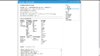
With thanks to Oliver freetz is now running with the AVM Fritz!Box WLAN 7340 :bier: I have just loaded a image compiled after change set 6475. If I get time tonight I will try with the latest changeset to see how this is running.

Untitled.jpg
 
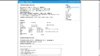
Beautiful. Can you please post a screenshot from the box_info page too?

Regards
Oliver
 
Hi,

I too have a fritzbox 7340, and I have a question that is related to this thread, ie. running freetz on this box. The problem I have with the 7340 is that IPv6 support of the AVM firmware is severely lacking. Consider this prefix: 2001:1:1::/48 (just an example !), this prefix gives a whopping 65.536 possible /64 subnets. The Fritzbox will assign itself a global IPv6 address using the following subnet 2001:1:1:0::/64, and will advertise this prefix to clients on the lan side. Furthermore, the inability to add static IPv6 routes, effectively means that the other 65.535 possible subnets cannot be utilized. Now I was able to simply telnet to the box and add static routes using IP -6 add route, this works and using the debug.cfg, will survive a reboot.

The other problem is the AVM firewall, which only lets me add hosts addresses, without the ability to enter the subnet address. Again this probably means that if I want to allow traffic on a certain port, it will only work on the first subnet 2001:1:1:0::/64.

Now my question is, will freetz let me properly configure the firewall, including the full IPv6 address (ie, network + host) ? I read somewhere that I could use IP6tables, but that the AVM firewall cannot be disabled, hence it seems that to allow traffic to a certain port, I first need to allow it on the AVM firewall. Any thoughts about this ?
 
Beautiful. Can you please post a screenshot from the box_info page too?

Regards
Oliver

Here you go this is compiled with the changeset from 01.02.11 (firmware bump) btw "@AVM/fritz.box/fritzbox.fon_wlan_7340/firmware/deutsch_a-ch" should read "@AVM/fritz.box/fritzbox.fon_wlan_7340/firmware/english" I guess they changed this after your update.

It also appears that the information is not completely correct, firstly by box is set up as Annex A but the freetz info page advertises it as Annex B and the Hz values do not appear to be rounded off to the last three digits or whatever should be used.

BoxInfo.jpg

Here is also the list from the enviroment tables.
CONFIG_WLAN='y'
CONFIG_WLAN_RADIOSENSOR='y'
CONFIG_FON_HD='y'
CONFIG_USB_STORAGE_USERS='n'
CONFIG_TIMERCONTROL='y'
CONFIG_EWETEL_SMARTMETER='n'
CONFIG_USB_HOST_AVM='n'
CONFIG_LFS='y'
CONFIG_FON_IPPHONE='y'
CONFIG_LTE='n'
CONFIG_PLUGIN='n'
CONFIG_I2C='n'
CONFIG_VPN_CERTSRV='n'
CONFIG_AB_COUNT='2'
CONFIG_WLAN_TXPOWER='y'
CONFIG_CAPI_NT='n'
CONFIG_ONLINEHELP_URL='http://help.avm.de/fritzbox.php?hardware=171&oem=avme&language=en&country=&version=99.04.88&subversion=6485M'
CONFIG_UDEV='n'
CONFIG_WLAN_OPENWIFI='n'
CONFIG_ATA_NOPASSTHROUGH='n'
CONFIG_JFFS2='y'
CONFIG_T38='y'
CONFIG_STOREUSRCFG='y'
CONFIG_NFS='n'
CONFIG_KIDS_CONTENT='n'
CONFIG_LED_EVENTS='y'
CONFIG_CODECS_IN_PCMROUTER='n'
CONFIG_CAPI_XILINX='y'
CONFIG_YAFFS2='n'
CONFIG_UBIK2='n'
CONFIG_SQLITE='y'
CONFIG_NEUERUL='y'
CONFIG_CHRONY='y'
CONFIG_FONGUI2='y'
CONFIG_CONFIGD='y'
CONFIG_DSL_UR8='n'
CONFIG_TAM_ONRAM='n'
CONFIG_FONQUALITY='y'
CONFIG_SQLITE_VIDEO='y'
CONFIG_FTP='y'
CONFIG_USB='n'
GCOV_PREFIX='/var/gcov'
OEM='avme'
CONFIG_MULTI_COUNTRY='y'
CONFIG_VDSL='y'
CONFIG_PRODUKT_NAME='FRITZ!Box Fon WLAN 7340'
CONFIG_ENVIRONMENT_PATH='/proc/sys/urlader'
CONFIG_OPENSSL='n'
CONFIG_DECT_AUDIOD='y'
CONFIG_DECT_NO_EMISSION='y'
CONFIG_USB_HOST_TI='n'
CONFIG_PROV_DEFAULT='y'
CONFIG_ASSIST='y'
CONFIG_SWAP='n'
CONFIG_LED_NO_DSL_LED='y'
CONFIG_NTFS='y'
CONFIG_SUBVERSION='freetz-devel-6485M'
CONFIG_VERSION='04.88'
CONFIG_DIAGNOSE_LEVEL='0'
CONFIG_USB_STORAGE='y'
CONFIG_USB_INTERNAL_HUB='n'
CONFIG_CAPI_POTS='y'
HWRevision_ATA='1'
CONFIG_SAMBA='y'
CONFIG_WEBSRV='y'
CONFIG_RELEASE='1'
CONFIG_BLUETOOTH_CTP='n'
CONFIG_DECT_MONI_EX='y'
Language_is_default='no'
CONFIG_ROMSIZE='16'
CONFIG_FIRMWARE_URL='http://www.avm.de/fritzbox-firmware-update.php?hardware=171&oem=avme&language=en&country='
CONFIG_SERVICEPORTAL_URL='http://www.avm.de/fritzbox-service-portal.php?hardware=171&oem=avme&language=en&country=&version=99.04.88&subversion=6485M'
CONFIG_PRODUKT='Fritz_Box_7340'
HWRevision='171'
HWRevision_BitFileCount=''
ANNEX='A'
CONFIG_BUTTON='y'
CONFIG_ACCESSORY_URL='http://www.avm.de/fritzbox_apps.php?hardware=171&oem=avme&language=en&country=&version=99.04.88&subversion=6485M'
CONFIG_VERSION_MAJOR='99'
CONFIG_MAILD='y'
CONFIG_XILINX='y'
CONFIG_TR064='y'
CONFIG_MEDIASRV_MOUNT='n'
CONFIG_DOCSIS_PCD_NO_REBOOT='n'
CONFIG_ONLINEHELP='y'
CONFIG_NQOS='y'
Country_is_default='no'
CONFIG_VPN='y'
CONFIG_USB_PRINT_SERV='y'
CONFIG_GDB='y'
CONFIG_UPNP='y'
CONFIG_ETH_COUNT='2'
CONFIG_USB_LTE='n'
CONFIG_WEBDAV='y'
CONFIG_CAPI='y'
CONFIG_MAILER='n'
CONFIG_TR069='y'
CONFIG_WLAN_GUEST='y'
CONFIG_CDROM_FALLBACK='n'
CONFIG_ONLINEPB='n'
CONFIG_USB_GSM='y'
CONFIG_WLAN_WEATHER_CAC='n'
CONFIG_USB_GSM_VOICE='n'
CONFIG_WLAN_WDS='y'
CONFIG_DECT='y'
CONFIG_WLAN_1130TNET='n'
CONFIG_CAPI_UBIK='n'
CONFIG_TELEKOM_KOFFER='n'
CONFIG_RAMDISK='n'
CONFIG_NAND='n'
CONFIG_MTD_MAILSEND='y'
CONFIG_INSTALL_TYPE='iks_16MB_xilinx_2eth_2ab_isdn_te_pots_wlan_usb_host_dect_63350'
CONFIG_DECT_PICTURED='y'
CONFIG_FAXSUPPORT='y'
enable_ata='1'
CONFIG_WLAN_MADWIFI='y'
CONFIG_MULTI_LANGUAGE='y'
CONFIG_QOS_METER='y'
CONFIG_SRTP='n'
CONFIG_IGD='y'
CONFIG_UNIQUE_PASSWD='n'
CONFIG_WLAN_WMM='y'
CONFIG_DECT_ONOFF='n'
CONFIG_OEM_DEFAULT='avm'
CONFIG_EXT2='y'
CONFIG_FAX2MAIL='y'
CONFIG_MEDIASRV='y'
CONFIG_ATA='y'
CONFIG_HOMEI2C='n'
CONFIG_BOX_FEEDBACK='n'
CONFIG_AUDIO='n'
CONFIG_BASIS='y'
CONFIG_SQLITE_BILDER='y'
CONFIG_VLYNQ='n'
CONFIG_DSL_MULTI_ANNEX='y'
CONFIG_IPV6='y'
CONFIG_WLAN_1350TNET='n'
CONFIG_VOIP_ENUM='n'
CONFIG_ECO='y'
CONFIG_INETD='y'
CONFIG_VLYNQ_PARAMS='vlynq_reset_bit_0'
CONFIG_LOGD='n'
CONFIG_WLAN_IPTV='y'
CONFIG_USB_WLAN_AUTH='y'
CONFIG_CDROM='n'
CONFIG_VOL_COUNTER='y'
CONFIG_WLAN_EACS='y'
CONFIG_REMOTE_HTTPS='y'
CONFIG_GDB_FULL='y'
CONFIG_HOSTNAME='fritz.fonwlan.box'
CONFIG_UTF8='y'
CONFIG_MEDIACLI='n'
CONFIG_USB_STORAGE_SPINDOWN='y'
CONFIG_LIB_MATH='y'
CONFIG_ECO_SYSSTAT='y'
CONFIG_DOCSIS_CLI='n'
CONFIG_USB_HOST='y'
CONFIG_DOCSIS='n'
CONFIG_AURA='y'
CONFIG_MAILER2='y'
CONFIG_DECT_14488='y'
ETC_CONFIG_PATH='/etc/init.d/rc.init'
CONFIG_WLAN_TCOM_PRIO='n'
Language='en'
CONFIG_DECT2='y'
CONFIG_WEBCM_INTERPRETER='y'
CONFIG_SESSIONID='y'
CONFIG_KIDS='y'
CONFIG_MTD_RSS='y'
CONFIG_CAPI_TE='y'
CONFIG_LABOR_DSL='n'
CONFIG_WLAN_WPS='y'
CONFIG_DECT_MONI='y'
CONFIG_ANNEX='B'
CONFIG_WEBUSB='y'
CONFIG_DSL_VENDORID=''
CONFIG_MINI='n'
Country='031'
CONFIG_ETH_GBIT='y'
CONFIG_VLYNQ0='3'
CONFIG_TAM_MODE='1'
CONFIG_WLAN_GREEN='y'
GCOV_PREFIX_STRIP='5'
TZ='CET-1CEST-2,M3.5.0/02:00:00,M10.5.0/03:00:00'
CONFIG_WLAN_SAVEMEM='n'
CONFIG_GDB_SERVER='y'
CONFIG_VLYNQ1='0'
CONFIG_MTD_MAIL='y'
CONFIG_CAPI_MIPS='n'
CONFIG_FONBOOK2='y'
OEM_DEFAULT_INDEX=''
CONFIG_NAS='n'
CONFIG_MORPHSTICK='n'
CONFIG_BLUETOOTH='n'
CONFIG_ATA_FULL='n'
CONFIG_LUA='y'
CONFIG_TAM='y'
CONFIG_SPEECH_FEEDBACK='n'
CONFIG_LLTD='n'
CONFIG_RAMSIZE='128'
CONFIG_FON='y'
CONFIG_LIBZ='y'
CONFIG_DECT_CATIQ20='n'
CONFIG_DSL='y'
CONFIG_IPTV_4THOME='y'
HWSubRevision='1'
 
Zuletzt bearbeitet:
AVM removed the "deutsch_a-ch" from the FTP server at a later point and only the "english" version remained.
 
Kostenlos!

Statistik des Forums

Themen
248,924
Beiträge
2,305,314
Mitglieder
378,651
Neuestes Mitglied
rehe992