Hi everyone,
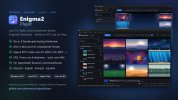
I've developed a program for Enigma2 receivers and I'm sharing it here for free: Enigma2 Player for Windows, macOS and Linux. It lets you watch live TV, radio and recordings from your receiver right on your PC or Mac, with several channels at once if you like.
macOS (Apple silicon): Download Enigma2 Player for Mac
macOS (Intel): Download Enigma2 Player for Intel Macs
Linux: Download Enigma2 Player for Linux (AppImage)
On the Mac, open the disk image, drag Enigma2 Player to Applications and start it from there. From macOS 15 on, when you connect for the first time, macOS asks whether the player may find devices on your local network: choose “Allow”, otherwise it cannot reach your receiver.
On Linux, make the file executable (right-click → Properties → “Run as a program”, or in a terminal “chmod +x Enigma2Player-x86_64.AppImage”) and double-click it to start.
These links never change and always deliver the latest version. More info: github.com/zakomania/enigma2player
Note: on first start Windows may show “Windows protected your PC” because the program isn't signed yet. Click “More info”, then “Run anyway”.
Enjoy!
Zakomania
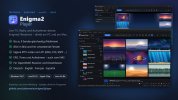
I've developed a program for Enigma2 receivers and I'm sharing it here for free: Enigma2 Player for Windows, macOS and Linux. It lets you watch live TV, radio and recordings from your receiver right on your PC or Mac, with several channels at once if you like.
What it does
- Multiview: 2, 3, 4, 6, 8 or 9 pictures at the same time
- Picture-in-picture with 1 to 8 small pictures over the main picture
- Detach pictures into separate windows, spread them across your screen (always on top) and dock them back
- Audio from exactly one picture, switched with one click
- Info bar like on the receiver: start and end with a progress bar, time left and the next programme right in the picture, also in full screen
- Drag & drop: drop channels and recordings onto a picture, swap pictures
- Saved views (layout and channels), loaded again with one key press
- Smart search across the TV guide of all channels, e.g. “football now” or “crime tonight”
- Collapsible bouquets with picons and IPTV groups, channel numbers as on your receiver, channel list on the left or right
- The channel currently playing on your receiver is marked in the channel list and opens in the player with one click – without an additional tuner
- Recordings from the receiver with cover images, resume, a seek bar and skip buttons (adjustable interval, e.g. past commercial breaks)
- EPG and timers (running recordings and timers marked, edit timers, even extend a running recording), virtual remote control, local recordings and screenshots
- Open stream or file: play stream links or video and music files from your computer or NAS
- IPTV lists from your PC (M3U, M3U8, PLS, XSPF …) in their own tab, in addition to the receiver – mixed with the box's channels and recordings in multiview
- Sleep timer: stop playback after 15 to 90 minutes or at the end of the show, the sound fades out slowly at the end
- Finds your receiver automatically on the network – with each box's name; save several receivers and switch with one click – also to boxes the player finds on your network; login with securely stored password
- English, German, French and Spanish, updates right inside the program
Requirements
- Windows 10 or 11 (64-bit), no administrator rights needed, VLC is already built in; also available as a portable version (e.g. for a USB stick)
- macOS 15 Sequoia or later on a Mac with Apple silicon (M1 or later), a separate version for Intel Macs from macOS 10.15 Catalina: open the disk image and drag Enigma2 Player to Applications, VLC is already built in
- Linux (64-bit): Ubuntu 22.04, Linux Mint 21, Debian 12, Fedora and newer – a single AppImage file, no installation and no root rights needed. VLC must be installed from your package manager (e.g. “sudo apt install vlc”, Fedora: “sudo dnf install vlc vlc-plugins-all”, Arch: “sudo pacman -S vlc vlc-plugins-all”); VLC as a Snap or Flatpak is not enough
- Enigma2 receiver with OpenWebif on the same network (tested with openATV 7.6 and 8.0 on GigaBlue UHD Quad 4K Pro, Zgemma H7 and Octagon SF8008)
- Dreamboxes with DreamOS (e.g. One, Two, DM920) and older Dreambox images are supported from version 2.2 through the Dreambox web interface, which the player detects automatically. Feedback from Dreambox users is very welcome.
- How many different channels can play at once depends on your receiver's free tuners. Channels on the same transponder need no extra tuner; an antenna icon in the channel list marks them.
Download
Windows: Download Enigma2 Player for WindowsmacOS (Apple silicon): Download Enigma2 Player for Mac
macOS (Intel): Download Enigma2 Player for Intel Macs
Linux: Download Enigma2 Player for Linux (AppImage)
On the Mac, open the disk image, drag Enigma2 Player to Applications and start it from there. From macOS 15 on, when you connect for the first time, macOS asks whether the player may find devices on your local network: choose “Allow”, otherwise it cannot reach your receiver.
On Linux, make the file executable (right-click → Properties → “Run as a program”, or in a terminal “chmod +x Enigma2Player-x86_64.AppImage”) and double-click it to start.
These links never change and always deliver the latest version. More info: github.com/zakomania/enigma2player
Note: on first start Windows may show “Windows protected your PC” because the program isn't signed yet. Click “More info”, then “Run anyway”.
Enjoy!
Zakomania
Anhänge
Zuletzt bearbeitet: