Fritzbox 7570 + ZTE MF110 3G-Modem

srca

Neuer User
Mitglied seit
10 Sep 2014
Beiträge
6
Punkte für Reaktionen
0
Punkte
0
Ich habe eine Fritzbox 7570 und nach ZTE MF110 Seite Modem unterstützt:

http://avm.de/nc/service/fritzbox/f...tion/show/238_Unterstuetzte-Mobilfunk-Modems/

Im Hauptmenü der Fritzbox ich keine Option, mich das Modem konfigurieren usb finden

Jemand eine Arbeits USB-3G-Modem an eine Fritzbox 7570 angeschlossen?
Die Firmware-Version 75.04.92 Fritzbox 7570
Die Version der Firmware ZTE MF110 ist MF110V1.0.0B01

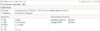
Startseite Heimnetz / USB-Geräte / Geräteübersicht kann ich das Modem bekomme ich folgende Fehler nicht erkennen:
"Zur Zeit sind keine USB-Geräte an der FRITZ!Box angeschlossen"

Ich habe versucht, direkt und durch ZTE USB-Hub anschließen und ich folgen, was unentdeckt

Kennen Sie alle mögliche Lösung ??

(Sorry für die Übersetzung Spanisch - Deutsch)

Danke
 
Ist der USB-Port vielleicht defekt, akzeptiert die Fritzbox 7570 andere Sticks, z.B. Flash-Dongles?

  • Test 1: Bitte mal Fritzbox 7570 ausschalten, ZTE MF110 stecken und dann wieder einschalten. Wird der Stick dann erkannt?
    .
  • Test 2: Das Self-Installation/Auto-Run-Feature abschalten:
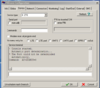
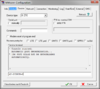
    Der Stick wird dauerhaft umgeschaltet auf Modem ohne Setup-CD-Drive per MWconn mit AT+ZCDRUN=8

    MWConn.png

Alles verstanden? Should I write in English?
 
thanks for the reply andilao

prefer in English

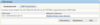
I've disabled the reproduction:


N3OZ3Yy.png

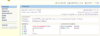
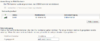
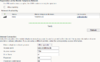
in the overview screen 1 USB device detected by:

zP4cNey.png

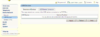
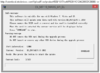
but usb devices screen indicates "no usb devices are connected to the fritzbox at this time":

v09t7iT.png

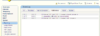
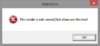
in the event log screen indicates "an unsupported USB device connected has-been":

udueX21.png
 
According to your picture from MWConn the stick was not recognized in your PC. Is that correct?

I checked that with a real MF110:
Code:
- Console started.
  Automatic port determination...
  Device recognized: ZTE
* Port COM7 has been opened.
  For console input please consult the
  service manual of your radio network modem!
And the output to AT+ZCDRUN=8 command was:
Code:
Command:  AT+ZCDRUN=8
AT+ZCDRUN=8

Close autorun state result(0:FAIL 1:SUCCESS):1
Infos:
Code:
ATI
Manufacturer: ZTE CORPORATION
Model: MF110
Revision: BD_P671A2[COLOR="#0000FF"]V1.0.1B02 = newer version[/COLOR]
IMEI: 35179003xxxxxxxx
+GCAP: +CGSM,+DS,+ES

At monday in company I will test my MF110 with one of the existing 7570.
The thread "ZTE-Surfstick in FB 7570 funktioniert nicht" from 2009 makes me really no great hope, and yes, after a few posts they lost focus completely. ;-)
 
Zuletzt bearbeitet von einem Moderator:
ok i tried again and got the ZTE MF110 detected:

Code:
- Console started.
 * Port COM11 has been opened.
  For console input please consult the
  service manual of your radio network modem!
Command:  AT+ZCDRUN=8

Close autorun state result(0:FAIL 1:SUCCESS):1

OK

but still does not recognize 7570:
"no usb devices are connected to the FRITZ!Box at this time"

:confused::confused::confused:


andilao thank you very much for doing the test on Monday in your company
 
Zuletzt bearbeitet:
My test today was successfull (only for me): MF110 and net fully recognized.

ZTE MF110 in FB7570.png ZTE MF110 in FB7570 vf.png

Fritzbox: 75.04.92
MF110 : BD_P671A2V1.0.1B02
 
ok, I got this:
Code:
DC - Unlocker 2 Client 1.00.0460

Detecting card :

selection :
manufacturer - ZTE datacards
model - Auto detect

Found modem         : MF110
Model               : ZTE MF110
IMEI                : 3517900xxxxxxxx
Firmware            : BD_P671A2V1.0.1B02
SIM Lock status     : unknown(read failed)

ZTE datacards Reading Dashboard ...
Dashboard size : 16697344 Bytes
OK !

Dashboard saved to file "D:\MF110\ZTEMODEM.ISO"
and a ZTEMODEM.ISO. Where in ZTEMODEM.ISO is the firmware?
 
Zuletzt bearbeitet von einem Moderator:
sorry you're right, this way you can not extract the firmware does the zte
:confused::confused::confused:
 
Zuletzt bearbeitet:
I've found a newer Version BD_P671A2V1.0.2B10 for MAXIS Malaysia: http://www.ztedevices.com/support/data_card/48111b42-65d9-4e35-a672-1df7b9609cc2.html (the 2nd RAR with Size: 31.28 MB, the other one is for Mac!) or direct from here.

MF110 MAXIS.png But without success: MF110 MAXIS fuckup.png


Update! MF110 Firmware BD_MOVP671A2V1.0.0B04 is fully compatible with FB 7570 (english/Spain):

MF110 vs 7570 1.png MF110 vs 7570 2.png MF110 vs 7570 3.png

Download version BD_MOVP671A2V1.0.0B04 (Movistar Mexico) from:
http://download.ztedevices.com/UploadFiles/product/515/1651/soft/P020110124400623395152.rar or
https://3ginfo.ru/e107_files/downloads/ZTE_MF110_MOV_ME_EUV1.00.00_3Ginfo.ru.7z
(DL_MF110_MOV_ME_EUV1.00.00.exe inside archives is identical)

I hope that is compatible with your MF110 too.
 
Zuletzt bearbeitet von einem Moderator:
after updating the firmware you indicate I get the same

"no usb devices are connected to the FRITZ! Box at this time"
:mad::mad:
 
:grrr: too ;-)

Did you check the 100% proper function of the USB port already?
Next steps: save the config, reset the Box and try again.
 
Kostenlos!

Statistik des Forums

Themen
248,924
Beiträge
2,305,326
Mitglieder
378,652
Neuestes Mitglied
stego88