

- Mitglied seit
- 11 Apr 2026
- Beiträge
- 1
- Punkte für Reaktionen
- 0
- Punkte
- 1
Hi all,
After many hours of trial and error I finally got my UniFi Express 7 working with 1&1 FTTH (ONT setup in Germany).
Since I couldn’t find a complete working solution anywhere, I’m sharing what worked for me in case it helps someone.
Setup:
- UniFi Express 7
- ISP: 1&1 FTTH (Germany)
- ONT provided by ISP (Sercomm)
- UniFi Network (latest version via browser)
Important note:
Before anything else, update the firmware of the UniFi Express 7.
I had to connect it temporarily behind my old router to do this.
Without the update, the device didn’t even detect the ONT ("no cable connected").
Connection:
ONT → WAN port (UniFi Express 7)
Laptop → LAN port (for setup)
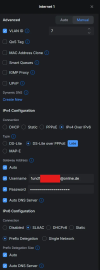
Configuration (key points):
- Internet connection type: PPPoE
- Username/password: from 1&1 control panel
- VLAN ID: 7 (required in my case)
IPv6 settings were critical:
- IPv4 works via IPv6 (DS-Lite)
- IPv6 enabled with prefix delegation
- Automatic configuration (no manual AFTR needed)
After applying these settings, the connection came up almost immediately without needing another reboot.
Hope this helps someone – this setup took way longer than expected
Bild(er) als Vorschaubild(er) (siehe https://www.ip-phone-forum.de/threads/ip-phone-forum-regeln.297224/ ) eingebunden by stoney
After many hours of trial and error I finally got my UniFi Express 7 working with 1&1 FTTH (ONT setup in Germany).
Since I couldn’t find a complete working solution anywhere, I’m sharing what worked for me in case it helps someone.
Setup:
- UniFi Express 7
- ISP: 1&1 FTTH (Germany)
- ONT provided by ISP (Sercomm)
- UniFi Network (latest version via browser)
Important note:
Before anything else, update the firmware of the UniFi Express 7.
I had to connect it temporarily behind my old router to do this.
Without the update, the device didn’t even detect the ONT ("no cable connected").
Connection:
ONT → WAN port (UniFi Express 7)
Laptop → LAN port (for setup)
Configuration (key points):
- Internet connection type: PPPoE
- Username/password: from 1&1 control panel
- VLAN ID: 7 (required in my case)
IPv6 settings were critical:
- IPv4 works via IPv6 (DS-Lite)
- IPv6 enabled with prefix delegation
- Automatic configuration (no manual AFTR needed)
After applying these settings, the connection came up almost immediately without needing another reboot.
Hope this helps someone – this setup took way longer than expected
Bild(er) als Vorschaubild(er) (siehe https://www.ip-phone-forum.de/threads/ip-phone-forum-regeln.297224/ ) eingebunden by stoney
Zuletzt bearbeitet von einem Moderator:

