VTO2000A-2 nach fehlgeschlagenem Update kein Netzwerk

Alex1812A

Neuer User
Mitglied seit
8 Feb 2021
Beiträge
31
Punkte für Reaktionen
2
Punkte
8
Hallo zusammen,

und ich hoffe jemand kann mir bei folgendem Problem weiterhelfen. Nach einem fehlgeschlagenem Update einer VTO2000A-2 von 3.2 auf 4.3 ist die VTO nicht mehr im Netzwerk erreichbar, auch Config Tool sieht diese nicht mehr.

Über UART kann ich hier folgende Informationen auslesen.
bootcmd=fsload
bootdelay=3
baudrate=115200
bootfile="uImage"
single=0
da=protect off all;tftp 81a00000 dm365_ubl_boot_16M.bin.img;flwrite
dc=tftp 81a00000 custom-x.cramfs.img; flwrite
dr=tftp 81a00000 romfs-x.cramfs.img; flwrite
du=tftp 81a00000 user-x.cramfs.img; flwrite
dd=tftp 81a00000 data-x.cramfs.img; flwrite
dw=tftp 81a00000 web-x.cramfs.img; flwrite
dg=tftp 81a00000 gui-x.cramfs.img; flwrite
dk=tftp 81a00000 kernel-x.cramfs.img; flwrite
up=tftp 81a00000 update.img; flwrite
tk=tftp 80800000 uImage; bootm 80800000
gionum=22.25
gioval=1.1
dh_com=0
autosip=192.168.254.254
autolip=192.168.1.108
autogw=192.168.1.1
autonm=255.255.255.0
ID=3K035A7PAN00009
ethaddr=14:A7:8B:01:5A:13
HWID=VTO2000A:0:4:1:3:5:0:1:9:3:3:0:1B0:0:0:0:0:0:0:0
netmask=255.255.255.0
gatewayip=192.168.1.1
eth1addr=00:01:5b:00:55:66
eth2addr=00:01:5b:00:77:88
bootargs= console=ttyS0,115200n8 root=/dev/mtdblock4 rootfstype=cramfs ,nolock mem=90M newmem=90M video=davincifb:vid0=OFF:vid1=OFF:osd0=OFF:osd1=OFF
appauto=1
dh_keyboard=0
serverip=192.168.178.100
ipaddr=192.168.178.150
stdin=serial
stdout=serial
stderr=serial
ver=U-Boot 1.3.6 (jerry) (May 23 2018 - 17:21:42)

DHBOOT#
sip 192.168.178.100;lip 192.168.178.150;saveenv
Set server ip address success!
Now server ip addr: 192.168.178.100
Set local address success!
Now local ip addr: 192.168.178.150
Saving Environment to SPI Flash...
Erasing SPI flash...Writing to SPI flash...done
DHBOOT#

run dr
davinci_eth_open:no link
TFTP from server 192.168.178.100; our IP address is 192.168.178.150
Filename 'romfs-x.cramfs.img'.
Load address: 0x81a00000
Loading: WARN: emac_send_packet: No link
WARN: emac_send_packet: No link
T WARN: emac_send_packet: No link
WARN: emac_send_packet: No link
T WARN: emac_send_packet: No link
WARN: emac_send_packet: No link
T WARN: emac_send_packet: No link
WARN: emac_send_packet: No link
T WARN: emac_send_packet: No link
WARN: emac_send_packet: No link
T WARN: emac_send_packet: No link
WARN: emac_send_packet: No link
T WARN: emac_send_packet: No link
WARN: emac_send_packet: No link
T WARN: emac_send_packet: No link
WARN: emac_send_packet: No link
T WARN: emac_send_packet: No link
WARN: emac_send_packet: No link
T WARN: emac_send_packet: No link
WARN: emac_send_packet: No link
T WARN: emac_send_packet: No link
WARN: emac_send_packet: No link
1743086651004.png

Laut Log scheint es wohl ein Problem mit dem Netzwerk vorzuliegen. Allerdings war diese vorher ja darüber erreichbar. Auch eine Direktverbindung mit dem Rechner und dem 2-Draht-Hub sowie manueller IP Konfiguration das gleiche Fehlerbild.

Frage: Gibt es eine Möglichkeit nur über UART (also ohne TFTP) zu recovern? Was könnte hier die Fehlerursache sein?

Wenn ich die VTO ganz normal boote, dann sehe ich in den Logs dass das OS intakt ist. Auch der Sabotagealarm wird akustisch ausgelöst.
 
habe soeben die MCU noch zur Sicherheit geflasht über ST-Link mit der V3.0 Firmware. Leider gleiches Fehlerbild...(davinci_eth_open:no link)

Checking DDR......OK

UBL Version: 1.46t(DM365)16:10:30 Aug 4 2017
Oscillator: 24MHZ
ARM Rate: 432 MHZ
DDR Rate: 340 MHZ
BootMode: SPI
Starting SPI Memory Copy...
DONE


U-Boot 1.3.6 (jerry) (May 23 2018 - 17:21:42)

DRAM: 128 MB
SF: Got idcode c2 20 18 c2 20
In: serial
Out: serial
Err: serial
Ethernet PHY: GENERIC @ 0x05,id:221513
total gio 2
gio[22]=1
gio[25]=1
davinci_eth_open:no link
TFTP from server 192.168.254.254; our IP address is 192.168.1.108; sending through gateway 192.168.1.1
Filename 'upgrade_info_7db780a713a4.txt'.
Load address: 0x80100000
Loading: WARN: emac_send_packet: No link
T WARN: emac_send_packet: No link
WARN: emac_send_packet: No link
T WARN: emac_send_packet: No link

Retry count exceeded; starting again
Fail to get info file!
Init error!
davinci_eth_open:no link
TFTP from server 192.168.254.254; our IP address is 192.168.1.108; sending through gateway 192.168.1.1
Filename 'failed.txt'.
Load address: 0x80200000
Loading: WARN: emac_send_packet: No link
T WARN: emac_send_packet: No link
WARN: emac_send_packet: No link
T WARN: emac_send_packet: No link
WARN: emac_send_packet: No link

Retry count exceeded; starting again
==>use default images
APP_OFFSET_NEW test
.......
## Booting kernel from Legacy Image at 80007fc0 ...
Image Name: Linux-2.6.18_pro500-davinci_evm-
Image Type: ARM Linux Kernel Image (uncompressed)
Data Size: 1799172 Bytes = 1.7 MB
Load Address: 80008000
Entry Point: 80008000
Verifying Checksum ... OK
XIP Kernel Image ... OK
OK

Starting kernel ...

Uncompressing Linux........................................................................................................................ done, booting the kernel.

Danke für jeden Tip.
 
Hätte jemand irgendeinen Ansatz, was hier das Problem sein kann?
 
Naja, kein Link würde ich sagen: "T WARN: emac_send_packet: No link".
Evtl. falschen Bootloader (Ethernet) auf die 2-Draht Variante installiert?

Wenn du einen PC am LAN Port des 2-Draht Umsetzers hast, kommt da irgend ein Paket daher von dem Teil daher, wenn du mit Wireshark snifferst?
 
Hallo Riogrande75,

danke für deine Rückmeldung. In Wireshark sehe ich keine Kommunikation zwischen VNC und dem PC, Log angehängt vom Bootvorgang.

Gibt es denn eine Möglichkeit den Bootloader nur über UART neu zu flashen? Vermutlich erst in den RAM laden und dann in den Flash kopieren... Habe hier noch keine Erfahrung bisher und wäre für weitere Hilfe dankbar.

Nachtrag: Soweit ich das der help Anweisung entnehmen kann, existieren hier 3 Übertragungsmethoden für Dateien:
loadb - load binary file over serial line (kermit mode)
loads - load S-Record file over serial line
loady - load binary file over serial line (ymodem mode)

loads ist eher uninteressant. Ich habe die loadb als auch die loady ausprobiert. Hierzu habe ich
1. die Datei dm365_ubl_boot_16M.bin.img unbenannt in dm365_ubl_boot_16M.bin
2. In YAT (Yet Another Terminal) die VTO gebootet und in der Konsole loadb bzw. loady ausprobiert. Nach Absetzen des Befehls habe ich die unbenannte Datei gesendet.

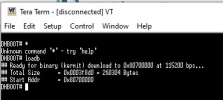
Im Log deutet ## Total Size = 0x00000000 = 0 Bytes wohl einen Fehler hin. Wäre super, wenn du mir hier weiterhelfen könntest bzw. auf Netzquelle verweisen... Ich habe bereits gefühlt das halbe Internet abgesucht diesbzgl.

Code:
loadb
## Ready for binary (kermit) download to 0x80700000 at 115200 bps...
'<ENQ><EM>Vg~<NUL><ETX><STX><NUL><NUL><NUL><STX><EOT><NUL><NUL>{~uX<ENQ><STX><ENQ><NUL>uboot<NUL><NUL><NUL><NUL><NUL><NUL><NUL><NUL><NUL><NUL><NUL><NUL><NUL><NUL><NUL><NUL><NUL><NUL><NUL><NUL><NUL><NUL><NUL><NUL><NUL><NUL><NUL><NUL> <NUL><NUL><NUL><NUL>x<NUL><NUL><FF><STX><NUL><NUL> <NUL><NUL><NUL> <NUL><NUL><NUL><NUL><NUL><NUL><NUL><NUL><NUL><NUL><NUL>p<DLE><NUL> <STX>Q<NUL><NUL>
1<SI><EM><NUL>1<SI> <SI><EM><NUL><GS><NUL><DC1/XON><SI> <NUL>4<DLE>4 <NUL><NUL>R<NUL><NUL> B!<EOT> R<SUB><EOT><NUL><NUL><NUL><NUL><SOH><NUL><NUL><SOH><NUL><NUL><NUL><NUL><NUL><STX> <NUL><SOH><NUL> t<NUL><STX><DC4><NUL><RS><NUL><NUL><NUL><NUL><NUL><NUL><NUL><NUL><NUL><NUL><NUL><NUL><NUL><NUL><NUL><NUL><NUL><NUL><NUL><NUL><NUL><NUL><NUL><NUL><NUL><NUL><NUL><NUL><NUL><NUL><NUL><NUL><NUL><NUL><NUL><NUL><NUL><NUL><NUL><NUL><NUL><NUL><NUL><NUL><NUL><NUL><NUL><NUL><NUL><NUL><NUL><NUL><NUL><NUL><NUL><NUL><NUL><NUL><NUL><NUL><NUL><NUL><NUL><NUL><NUL><NUL><NUL><NUL><NUL><NUL><NUL><NUL><NUL><NUL><NUL><NUL><NUL><NUL><NUL><NUL><NUL><NUL><NUL><NUL><NUL><NUL><NUL><NUL><NUL><NUL><NUL><NUL><NUL><NUL><NUL><NUL><NUL><NUL><NUL><SI><NUL><DC3/XOFF><NUL><NUL><NUL><DLE><SI><DC1/XON><FF><NUL><STX><NUL><SOH>
## Total Size = 0x00000000 = 0 Bytes
## Start Addr = 0x80700000
<EM><DC1/XON><US><DC3/XOFF><DC1/XON><FF><RS><BEL><DC3/XOFF><FF><FF><SUB><FF>* <INTERRUPT>
<DLE><SI><SOH><NUL><FF><NUL><NUL><RS>M<SOH><NUL>Ѝ<NUL><RS><NUL><RS><NUL><RS>@-@<SOH><NUL><NUL><NUL><FF><NUL>\<NUL><NUL><NUL><DC3/XOFF><NUL><NUL>`<NUL><SOH><NUL><NUL>@<SOH><SO><NUL>V<NUL><NUL>Q,PE%<NUL>Q:<ENQ><NUL>Q*<NUL><NUL>M0<DC3/XOFF>!<DLE><ENQ><NUL><SOH><NUL>P<NUL><NUL>
<SOH><NUL>P
<NUL><NUL><SUB><NUL><NUL>LȠ<FF><NUL><NUL><NUL><NUL><NUL><NUL><NUL>-!<DLE><ENQ><NUL><ETX><NUL>P<NUL><NUL>
<SOH><NUL><NUL><NUL><SUB><NUL><NUL><NUL><NUL><NUL><NUL>8@-@<NUL> <NUL><DLE><NUL><DLE>0<EOT><NUL><NUL>P<EOT><NUL><ENQ><DLE>D<NUL><EOT><NUL><SOH> <ENQ><DLE><NUL><NUL> $<EOT><NUL><ENQ><DLE><STX><NUL>M<DLE><ENQ><NUL><NUL>
<SOH><NUL><NUL><SUB><NUL><SOH><NUL><NUL>M<DLE><NUL><DLE><DLE><ENQ><NUL><STX><NUL>P<NUL><NUL>
<SOH><NUL>P<NUL><NUL>
<SOH><NUL><SI><NUL><NUL><NUL><DLE><NUL><NUL><FF><DLE><SOH><NUL>\ <NUL><SUB><SOH><NUL><BEL><NUL><NUL><NUL><NUL><DLE><FF><NUL><FF><DLE><SOH><NUL><NUL><NUL><SUB><SOH><NUL>-0<NUL><DLE> <ETX><NUL><NUL><NUL>P
M<DLE><STX>0<ENQ> <NUL>

Nachtrag:
Ich konnte mittels einem anderen Terminal Programm die Datei dm365_ubl_boot_16M.bin.img erfolgreich mittels kermit versenden.
1743505481182.png

Nach Versuch diesen Code zu starten, bleibt jedoch die VTO hier stehen und hier passiert nichts mehr
Variante 1:
DHBOOT#
go 0x80700000
go 0x80700000
## Starting application at 0x80700000 ...

Variante 2: (aufgrund von dem Hinweis aus https://community.nxp.com/t5/i-MX-Processors/Update-u-boot-via-serial-communication/m-p/318902)
DHBOOT#
go 0x80700400
go 0x80700400
## Starting application at 0x80700400 ...

Und nun weiss ich auch nicht mehr weiter... :(
 

Anhänge

Zuletzt bearbeitet:
Ist schon mal gut, dass du Files per kermit auf die VTO bringst. Dann sollte man das schon wieder hinbekommen.
Ich vermute mal, dass du den Bootloader nicht aus dem Bootloader raus starten kannst.
Versuche das per kermit übertragene File zu flashen. Da gibts bestimmt ein Command im Uboot dafür. Danach reboot und dann das "übliche" Uart Flash Prozedere.
 
das ist echt zum verzweifeln. Ich habe inzwischen das gesamte Image einzeln über kermit geflasht und dennoch funktioniert es nicht. Übersehe ich hier etwas? Noch irgendeine Idee?

DHBOOT# loadb 0x81a00000
## Ready for binary (kermit) download to 0x81A00000 at 115200 bps...
## Total Size = 0x0003f8d0 = 260304 Bytes
## Start Addr = 0x81A00000
DHBOOT#
DHBOOT# loadb 0x81a00000
## Ready for binary (kermit) download to 0x81A00000 at 115200 bps...
## Total Size = 0x0003e628 = 255528 Bytes
## Start Addr = 0x81A00000
DHBOOT# flwrite

## Checking Image at 0x81a00000 ...
Header CRC Checking ... OK
Image Name: uboot
Image Type: ARM Linux Firmware (uncompressed)
Data Size: 255464 Bytes = 249.5 kB
Load Address: 02000000
Entry Point: 02040000
Data CRC Checking ... OK
Programing start at: 0x00000000
write : 100%
done
DHBOOT# loadb 0x81a00000
## Ready for binary (kermit) download to 0x81A00000 at 115200 bps...
## Total Size = 0x00014040 = 81984 Bytes
## Start Addr = 0x81A00000
DHBOOT# flwrite

## Checking Image at 0x81a00000 ...
Header CRC Checking ... OK
Image Name: custom
Image Type: ARM Linux Standalone Program (gzip compressed)
Data Size: 81920 Bytes = 80 kB
Load Address: 02060000
Entry Point: 02080000
Data CRC Checking ... OK
Programing start at: 0x00060000
write : 100%
done
DHBOOT# loadb 0x81a00000
## Ready for binary (kermit) download to 0x81A00000 at 115200 bps...
## Total Size = 0x002f7040 = 3108928 Bytes
## Start Addr = 0x81A00000
DHBOOT# flwrite

## Checking Image at 0x81a00000 ...
Header CRC Checking ... OK
Image Name: romfs
Image Type: ARM Linux Kernel Image (gzip compressed)
Data Size: 3108864 Bytes = 3 MB
Load Address: 02280000
Entry Point: 02580000
Data CRC Checking ... OK
Programing start at: 0x00280000
write : 100%
done
DHBOOT# loadb 0x81a00000
## Ready for binary (kermit) download to 0x81A00000 at 115200 bps...
## Total Size = 0x005d1040 = 6099008 Bytes
## Start Addr = 0x81A00000
DHBOOT# flwrite

## Checking Image at 0x81a00000 ...
Header CRC Checking ... OK
Image Name: user
Image Type: ARM Linux Kernel Image (gzip compressed)
Data Size: 6098944 Bytes = 5.8 MB
Load Address: 028e0000
Entry Point: 02ee0000
Data CRC Checking ... OK
Programing start at: 0x008e0000
write : 100%
done
DHBOOT# loadb 0x81a00000
## Ready for binary (kermit) download to 0x81A00000 at 115200 bps...
## Total Size = 0x000f5040 = 1003584 Bytes
## Start Addr = 0x81A00000
DHBOOT# flwrite

## Checking Image at 0x81a00000 ...
Header CRC Checking ... OK
Image Name: data
Image Type: ARM Linux Kernel Image (gzip compressed)
Data Size: 1003520 Bytes = 980 kB
Load Address: 02ee0000
Entry Point: 03000000
Data CRC Checking ... OK
Programing start at: 0x00ee0000
write : 100%
done
DHBOOT# loadb 0x81a00000
## Ready for binary (kermit) download to 0x81A00000 at 115200 bps...
## Total Size = 0x00169040 = 1478720 Bytes
## Start Addr = 0x81A00000
DHBOOT# flwrite

## Checking Image at 0x81a00000 ...
Header CRC Checking ... OK
Image Name: web
Image Type: ARM Linux Standalone Program (gzip compressed)
Data Size: 1478656 Bytes = 1.4 MB
Load Address: 02580000
Entry Point: 02780000
Data CRC Checking ... OK
Programing start at: 0x00580000
write : 100%
done
DHBOOT# loadb 0x81a00000
## Ready for binary (kermit) download to 0x81A00000 at 115200 bps...
## Total Size = 0x001b06e8 = 1771240 Bytes
## Start Addr = 0x81A00000
DHBOOT# flwrite

## Checking Image at 0x81a00000 ...
Header CRC Checking ... OK
Image Name: linux
Image Type: ARM Linux Kernel Image (gzip compressed)
Data Size: 1771176 Bytes = 1.7 MB
Load Address: 02080000
Entry Point: 02280000
Data CRC Checking ... OK
Programing start at: 0x00080000
write : 100%
done
DHBOOT# protect off all
DHBOOT# loadb 0x81a00000
## Ready for binary (kermit) download to 0x81A00000 at 115200 bps...
## Total Size = 0x0003e628 = 255528 Bytes
## Start Addr = 0x81A00000
DHBOOT# flwrite

## Checking Image at 0x81a00000 ...
Header CRC Checking ... OK
Image Name: uboot
Image Type: ARM Linux Firmware (uncompressed)
Data Size: 255464 Bytes = 249.5 kB
Load Address: 02000000
Entry Point: 02040000
Data CRC Checking ... OK
Programing start at: 0x00000000
write : 100%
done
DHBOOT0
Unknown command 'load0' - try 'help'
DHBOOT# loadb 0x82000000
## Ready for binary (kermit) download to 0x82000000 at 115200 bps...
## Total Size = 0x0000b040 = 45120 Bytes
## Start Addr = 0x82000000
DHBOOT# flwrite

## Checking Image at 0x82000000 ...
Header CRC Checking ... OK
Image Name: product
Image Type: ARM Linux Standalone Program (gzip compressed)
Data Size: 45056 Bytes = 44 kB
Load Address: 028c0000
Entry Point: 028e0000
Data CRC Checking ... OK
Programing start at: 0x008c0000
write : 100%
done
DHBOOT#

Checking DDR......OK

UBL Version: 1.46t(DM365)09:30:17 Sep 2 2014
Oscillator: 24MHZ
ARM Rate: 432 MHZ
DDR Rate: 340 MHZ
BootMode: SPI
Starting SPI Memory Copy...
DONE


U-Boot 1.3.6 (jerry) (Sep 2 2014 - 09:44:01)

DRAM: 128 MB
SF: Got idcode c2 20 18 c2 20
In: serial
Out: serial
Err: serial
Ethernet PHY: GENERIC @ 0x05,id:221513
total gio 2
gio[22]=1
gio[25]=1
*
*
davinci_eth_open:no link
TFTP from server 192.168.254.254; our IP address is 192.168.1.108; sending through gateway 192.168.1.1
Filename 'upgrade_info_7db780a713a4.txt'.
Load address: 0x80100000
Loading: WARN: emac_send_packet: No link
*
*
*
*

Retry count exceeded; starting again
Fail to get info file!
Init error!
*
*
*
*
*
*
*
*
*
*
*
*
davinci_eth_open:no link
TFTP from server 192.168.254.254; our IP address is 192.168.1.108; sending through gateway 192.168.1.1
Filename 'failed.txt'.
Load address: 0x80200000
Loading: WARN: emac_send_packet: No link
*
*
*
*
*

Retry count exceeded; starting again
==>use default images
.DHBOOT#
*
DHBOOT#
DHBOOT#
*
*
Unknown command '*' - try 'help'
DHBOOT#
DHBOOT# *
*
Unknown command '*' - try 'help'
DHBOOT#
DHBOOT#
printenv
printenv
bootcmd=fsload
bootdelay=3
baudrate=115200
bootfile="uImage"
single=0
da=protect off all;tftp 81a00000 dm365_ubl_boot_16M.bin.img;flwrite
dc=tftp 81a00000 custom-x.cramfs.img; flwrite
dr=tftp 81a00000 romfs-x.cramfs.img; flwrite
du=tftp 81a00000 user-x.cramfs.img; flwrite
dd=tftp 81a00000 data-x.cramfs.img; flwrite
dw=tftp 81a00000 web-x.cramfs.img; flwrite
dg=tftp 81a00000 gui-x.cramfs.img; flwrite
dk=tftp 81a00000 kernel-x.cramfs.img; flwrite
up=tftp 81a00000 update.img; flwrite
tk=tftp 80800000 uImage; bootm 80800000
gionum=22.25
gioval=1.1
dh_com=0
autosip=192.168.254.254
autolip=192.168.1.108
autogw=192.168.1.1
autonm=255.255.255.0
ID=3K035A7PAN00009
ethaddr=14:A7:8B:01:5A:13
HWID=VTO2000A:0:4:1:3:5:0:1:9:3:3:0:1B0:0:0:0:0:0:0:0
netmask=255.255.255.0
gatewayip=192.168.1.1
eth1addr=00:01:5b:00:55:66
eth2addr=00:01:5b:00:77:88
bootargs= console=ttyS0,115200n8 root=/dev/mtdblock4 rootfstype=cramfs ,nolock mem=90M newmem=90M video=davincifb:vid0=OFF:vid1=OFF:osd0=OFF:osd1=OFF
appauto=1
dh_keyboard=0
serverip=192.168.178.100
ipaddr=192.168.178.151
stdin=serial
stdout=serial
stderr=serial
ver=U-Boot 1.3.6 (jerry) (Sep 2 2014 - 09:44:01)

Environment size: 1155/16380 bytes
DHBOOT#
sip 192.168.178.100;lip 192.168.178.151;saveenv
Set server ip address success!
Now server ip addr: 192.168.178.100
Set local address success!
Now local ip addr: 192.168.178.151
Saving Environment to SPI Flash...
Erasing SPI flash...Writing to SPI flash...done
DHBOOT#
DHBOOT#
tftp 0x82000000 pd-x.cramfs.img; flwrite
davinci_eth_open:no link
TFTP from server 192.168.178.100; our IP address is 192.168.178.151
Filename 'pd-x.cramfs.img'.
Load address: 0x82000000
Loading: WARN: emac_send_packet: No link
WARN: emac_send_packet: No link
T WARN: emac_send_packet: No link
WARN: emac_send_packet: No link
T WARN: emac_send_packet: No link
WARN: emac_send_packet: No link
T WARN: emac_send_packet: No link
WARN: emac_send_packet: No link
T WARN: emac_send_packet: No link
WARN: emac_send_packet: No link
T WARN: emac_send_packet: No link
WARN: emac_send_packet: No link
T WARN: emac_send_packet: No link
WARN: emac_send_packet: No link
T WARN: emac_send_packet: No link
WARN: emac_send_packet: No link
T WARN: emac_send_packet: No link
WARN: emac_send_packet: No link
T WARN: emac_send_packet: No link
WARN: emac_send_packet: No link
T WARN: emac_send_packet: No link
WARN: emac_send_packet: No link
 
Konzentriere dich mal nicht zu sehr auf den Bootloader, bin mir nicht sicher, ob das ein anderer ist als bei der LAN Version.
Welche IP's sind denn aktuell eingestellt im uboot (printenv)?
Wenn du die LAN Port Leds an der VNC blinkend hast, dann muss da etwas rauskommen und du das mit Wireshark am PC sehn.
Mach nochmal einen Trace, filtere auf " !eth.addr==xx:yy:zz:xx:yy:zz ", wobei xyyzzxxyyzz die MAC Adresse deines Wireshark PC's ist.
Irgendwas kommt da bestimmt raus (ARP,etc.). Die IP's am PC sollten 192.168.1.108+192.168.1.254 sein.
 
Zuletzt bearbeitet:
Morgen Riogrande,

aktuelle IP's sind 192.168.178.100 für den PC und 192.168.178.151 für die VTO. Die LEDs am VNC blinken auch...

Ich habe am gleichen Setup am Channel2 eine intakte VTH angeschlossen und diese sehe ich auch im Config Tool. Müsste ich damit nicht ein Problem der Netzwerkverbindung ausschließen können?

Auch habe ich mit einem Multimeter die Verbindung am Channel1 durchgemessen um hier Kabelbruch oder Verbindungsfehler auszuschließen. Gemessen am Anschlussblock VNC und verlöteteter Anschlußblock VTO. Auch hier alles korrekt soweit.

Mir ist nicht ganz klar, welche Funktion die MCU(STM) versus Bootloader haben...?

bootcmd=fsload
bootdelay=3
baudrate=115200
bootfile="uImage"
single=0
da=protect off all;tftp 81a00000 dm365_ubl_boot_16M.bin.img;flwrite
dc=tftp 81a00000 custom-x.cramfs.img; flwrite
dr=tftp 81a00000 romfs-x.cramfs.img; flwrite
du=tftp 81a00000 user-x.cramfs.img; flwrite
dd=tftp 81a00000 data-x.cramfs.img; flwrite
dw=tftp 81a00000 web-x.cramfs.img; flwrite
dg=tftp 81a00000 gui-x.cramfs.img; flwrite
dk=tftp 81a00000 kernel-x.cramfs.img; flwrite
up=tftp 81a00000 update.img; flwrite
tk=tftp 80800000 uImage; bootm 80800000
gionum=22.25
gioval=1.1
dh_com=0
autosip=192.168.254.254
autolip=192.168.1.108
autogw=192.168.1.1
autonm=255.255.255.0
ID=3K035A7PAN00009
ethaddr=14:A7:8B:01:5A:13
HWID=VTO2000A:0:4:1:3:5:0:1:9:3:3:0:1B0:0:0:0:0:0:0:0
netmask=255.255.255.0
gatewayip=192.168.1.1
eth1addr=00:01:5b:00:55:66
eth2addr=00:01:5b:00:77:88
bootargs= console=ttyS0,115200n8 root=/dev/mtdblock4 rootfstype=cramfs ,nolock mem=90M newmem=90M video=davincifb:vid0=OFF:vid1=OFF:osd0=OFF:osd1=OFF
appauto=1
dh_keyboard=0
serverip=192.168.178.100
ipaddr=192.168.178.151
stdin=serial
stdout=serial
stderr=serial
ver=U-Boot 1.3.6 (jerry) (Sep 2 2014 - 09:44:01)

[Edit Novize: Beiträge zusammengefasst - siehe Forumsregeln]

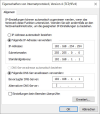
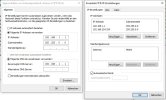
da ich mit Wireshark nicht besonders vertraut bin, habe ich nun an dem Setup eine funktionierende VTO angeschlossen. Der VNC ist direkt mit dem PC verbunden. PC hat folgende Netzwerkkonfiguration:
1743580684505.png
[Edit Novize: Bild auf Vorschau geschrumft - siehe Forumsregeln]

1 0.000000 MicroStarINT_a4:2c:3c LLDP_Multicast LLDP 58 MA/04:7c:16:a4:2c:3c MA/04:7c:16:a4:2c:3c 3601
2 0.023431 fe80::bbc8:712a:bbd1:2dc4 ff02::1:2 DHCPv6 157 Solicit XID: 0x2ca29d CID: 000100012dec961b047c16a42c3c
3 0.091841 MicroStarINT_a4:2c:3c Broadcast ARP 42 Who has 169.254.33.194? (ARP Probe)
4 0.091859 MicroStarINT_a4:2c:3c Broadcast ARP 42 Who has 192.168.254.254? (ARP Probe)
5 0.091977 :: ff02::1:ffd1:2dc4 ICMPv6 78 Neighbor Solicitation for fe80::bbc8:712a:bbd1:2dc4
6 0.092010 fe80::bbc8:712a:bbd1:2dc4 ff02::2 ICMPv6 62 Router Solicitation
7 0.092053 fe80::bbc8:712a:bbd1:2dc4 ff02::16 ICMPv6 110 Multicast Listener Report Message v2
8 0.598344 fe80::bbc8:712a:bbd1:2dc4 ff02::16 ICMPv6 110 Multicast Listener Report Message v2
9 1.003601 MicroStarINT_a4:2c:3c LLDP_Multicast LLDP 58 MA/04:7c:16:a4:2c:3c MA/04:7c:16:a4:2c:3c 3601
10 1.034813 fe80::bbc8:712a:bbd1:2dc4 ff02::1:2 DHCPv6 157 Solicit XID: 0x2ca29d CID: 000100012dec961b047c16a42c3c
11 1.096530 MicroStarINT_a4:2c:3c Broadcast ARP 42 Who has 169.254.33.194? (ARP Probe)
12 1.096582 MicroStarINT_a4:2c:3c Broadcast ARP 42 Who has 192.168.254.254? (ARP Probe)
13 1.096890 fe80::bbc8:712a:bbd1:2dc4 ff02::1 ICMPv6 86 Neighbor Advertisement fe80::bbc8:712a:bbd1:2dc4 (ovr) is at 04:7c:16:a4:2c:3c
14 1.097022 fe80::bbc8:712a:bbd1:2dc4 ff02::2 ICMPv6 70 Router Solicitation from 04:7c:16:a4:2c:3c
15 1.108798 fe80::bbc8:712a:bbd1:2dc4 ff02::16 ICMPv6 90 Multicast Listener Report Message v2
16 1.109512 fe80::bbc8:712a:bbd1:2dc4 ff02::16 ICMPv6 90 Multicast Listener Report Message v2
17 1.109844 fe80::bbc8:712a:bbd1:2dc4 ff02::fb MDNS 101 Standard query 0x0000 ANY DESKTOP-QT2M7AA.local, "QM" question
18 1.110059 fe80::bbc8:712a:bbd1:2dc4 ff02::fb MDNS 123 Standard query response 0x0000 AAAA fe80::bbc8:712a:bbd1:2dc4
19 1.110765 fe80::bbc8:712a:bbd1:2dc4 ff02::fb MDNS 101 Standard query 0x0000 ANY DESKTOP-QT2M7AA.local, "QM" question
20 1.110937 fe80::bbc8:712a:bbd1:2dc4 ff02::fb MDNS 123 Standard query response 0x0000 AAAA fe80::bbc8:712a:bbd1:2dc4
21 1.112213 fe80::bbc8:712a:bbd1:2dc4 ff02::c UDP/XML 1156 49290 → 3702 Len=1094
22 1.308784 fe80::bbc8:712a:bbd1:2dc4 ff02::c UDP/XML 1156 49290 → 3702 Len=1094
23 1.325100 fe80::bbc8:712a:bbd1:2dc4 ff02::c SSDP 189 M-SEARCH * HTTP/1.1
24 1.355816 fe80::bbc8:712a:bbd1:2dc4 ff02::c SSDP 183 M-SEARCH * HTTP/1.1
25 1.387781 fe80::bbc8:712a:bbd1:2dc4 ff02::c SSDP 181 M-SEARCH * HTTP/1.1
26 1.594232 fe80::bbc8:712a:bbd1:2dc4 ff02::16 ICMPv6 110 Multicast Listener Report Message v2
27 1.700742 fe80::bbc8:712a:bbd1:2dc4 ff02::c UDP/XML 1156 49290 → 3702 Len=1094
28 2.013990 MicroStarINT_a4:2c:3c LLDP_Multicast LLDP 58 MA/04:7c:16:a4:2c:3c MA/04:7c:16:a4:2c:3c 3601
29 2.094006 MicroStarINT_a4:2c:3c Broadcast ARP 42 Who has 169.254.33.194? (ARP Probe)
30 2.094067 MicroStarINT_a4:2c:3c Broadcast ARP 42 Who has 192.168.254.254? (ARP Probe)
31 2.094157 fe80::bbc8:712a:bbd1:2dc4 ff02::2 ICMPv6 70 Router Solicitation from 04:7c:16:a4:2c:3c
32 2.155448 fe80::bbc8:712a:bbd1:2dc4 ff02::c UDP/XML 1156 49290 → 3702 Len=1094
33 3.006863 MicroStarINT_a4:2c:3c LLDP_Multicast LLDP 58 MA/04:7c:16:a4:2c:3c MA/04:7c:16:a4:2c:3c 3601
34 3.039124 fe80::bbc8:712a:bbd1:2dc4 ff02::1:2 DHCPv6 157 Solicit XID: 0x2ca29d CID: 000100012dec961b047c16a42c3c
35 3.100434 MicroStarINT_a4:2c:3c Broadcast ARP 42 ARP Announcement for 169.254.33.194
36 3.100495 MicroStarINT_a4:2c:3c Broadcast ARP 42 ARP Announcement for 192.168.254.254
37 3.108935 fe80::bbc8:712a:bbd1:2dc4 ff02::16 ICMPv6 90 Multicast Listener Report Message v2
38 3.109001 192.168.254.254 224.0.0.22 IGMPv3 54 Membership Report / Leave group 224.0.0.252
39 3.113950 fe80::bbc8:712a:bbd1:2dc4 ff02::16 ICMPv6 90 Multicast Listener Report Message v2
40 3.114024 192.168.254.254 224.0.0.22 IGMPv3 54 Membership Report / Join group 224.0.0.252 for any sources
41 3.116123 192.168.254.254 224.0.0.251 MDNS 81 Standard query 0x0000 ANY DESKTOP-QT2M7AA.local, "QM" question
42 3.116437 fe80::bbc8:712a:bbd1:2dc4 ff02::fb MDNS 101 Standard query 0x0000 ANY DESKTOP-QT2M7AA.local, "QM" question
43 3.120099 192.168.254.254 224.0.0.251 MDNS 81 Standard query 0x0000 ANY DESKTOP-QT2M7AA.local, "QM" question
44 3.120266 fe80::bbc8:712a:bbd1:2dc4 ff02::fb MDNS 101 Standard query 0x0000 ANY DESKTOP-QT2M7AA.local, "QM" question
45 3.120589 fe80::bbc8:712a:bbd1:2dc4 ff02::1:3 LLMNR 95 Standard query 0x31bb ANY DESKTOP-QT2M7AA
46 3.120691 192.168.254.254 224.0.0.252 LLMNR 75 Standard query 0x31bb ANY DESKTOP-QT2M7AA
47 3.126548 fe80::bbc8:712a:bbd1:2dc4 ff02::fb MDNS 139 Standard query response 0x0000 AAAA fe80::bbc8:712a:bbd1:2dc4 A 192.168.254.254
48 3.126669 fe80::bbc8:712a:bbd1:2dc4 ff02::fb MDNS 139 Standard query response 0x0000 AAAA fe80::bbc8:712a:bbd1:2dc4 A 192.168.254.254
49 3.126939 192.168.254.254 224.0.0.251 MDNS 119 Standard query response 0x0000 AAAA fe80::bbc8:712a:bbd1:2dc4 A 192.168.254.254
50 3.127101 192.168.254.254 224.0.0.251 MDNS 119 Standard query response 0x0000 AAAA fe80::bbc8:712a:bbd1:2dc4 A 192.168.254.254
51 3.148451 fe80::bbc8:712a:bbd1:2dc4 ff02::c UDP/XML 1156 49290 → 3702 Len=1094
52 3.148600 192.168.254.254 239.255.255.250 UDP/XML 1124 49289 → 3702 Len=1082
53 3.195187 192.168.254.254 192.168.255.255 NBNS 110 Registration NB DESKTOP-QT2M7AA<20>
54 3.195330 192.168.254.254 192.168.255.255 NBNS 110 Registration NB WORKGROUP<00>
55 3.242942 192.168.254.254 239.255.255.250 UDP/XML 1124 49289 → 3702 Len=1082
56 3.395000 fe80::bbc8:712a:bbd1:2dc4 ff02::c UDP/XML 1156 49290 → 3702 Len=1094
57 3.425611 192.168.254.254 239.255.255.250 UDP/XML 1124 49289 → 3702 Len=1082
58 3.457702 192.168.254.254 192.168.255.255 UDP 179 57289 → 59870 Len=137
59 3.458281 192.168.254.254 192.168.255.255 UDP 208 57292 → 59870 Len=166
60 3.458518 192.168.254.254 192.168.255.255 UDP 222 57295 → 59870 Len=180
61 3.462736 MicroStarINT_a4:2c:3c Broadcast ARP 42 Who has 192.168.1.1? Tell 192.168.254.254
62 3.598496 MicroStarINT_a4:2c:3c Broadcast ARP 42 Who has 192.168.1.1? Tell 192.168.254.254
63 3.598577 192.168.254.254 224.0.0.22 IGMPv3 54 Membership Report / Join group 224.0.0.252 for any sources
64 3.598777 fe80::bbc8:712a:bbd1:2dc4 ff02::16 ICMPv6 90 Multicast Listener Report Message v2
65 3.768400 192.168.254.254 239.255.255.250 UDP/XML 1124 49289 → 3702 Len=1082
66 3.860425 fe80::bbc8:712a:bbd1:2dc4 ff02::c UDP/XML 1156 49290 → 3702 Len=1094
67 3.952306 192.168.254.254 192.168.255.255 NBNS 110 Registration NB DESKTOP-QT2M7AA<20>
68 3.952341 192.168.254.254 192.168.255.255 NBNS 110 Registration NB WORKGROUP<00>
69 4.310834 fe80::bbc8:712a:bbd1:2dc4 ff02::c UDP/XML 1156 49290 → 3702 Len=1094
70 4.470858 MicroStarINT_a4:2c:3c Broadcast ARP 42 Who has 192.168.1.1? Tell 192.168.254.254
71 4.550332 MicroStarINT_a4:2c:3c Broadcast ARP 42 Who has 192.168.177.42? Tell 192.168.254.254
72 4.596507 MicroStarINT_a4:2c:3c Broadcast ARP 42 Who has 192.168.1.1? Tell 192.168.254.254
73 4.697306 MicroStarINT_a4:2c:3c Broadcast ARP 42 Who has 192.168.1.1? Tell 192.168.254.254
74 4.706865 192.168.254.254 192.168.255.255 NBNS 110 Registration NB WORKGROUP<00>
75 4.707108 192.168.254.254 192.168.255.255 NBNS 110 Registration NB DESKTOP-QT2M7AA<20>
76 5.101088 MicroStarINT_a4:2c:3c Broadcast ARP 42 Who has 192.168.177.42? Tell 192.168.254.254
77 5.340398 MicroStarINT_a4:2c:3c Broadcast ARP 42 Who has 192.168.1.1? Tell 192.168.254.254
78 5.463476 192.168.254.254 192.168.255.255 NBNS 110 Registration NB DESKTOP-QT2M7AA<20>
79 5.463716 192.168.254.254 192.168.255.255 NBNS 110 Registration NB WORKGROUP<00>
80 5.605197 MicroStarINT_a4:2c:3c Broadcast ARP 42 Who has 192.168.1.1? Tell 192.168.254.254
81 6.047676 192.168.254.254 239.255.255.250 SSDP 179 M-SEARCH * HTTP/1.1
82 6.095281 MicroStarINT_a4:2c:3c Broadcast ARP 42 Who has 192.168.177.42? Tell 192.168.254.254
83 6.346527 MicroStarINT_a4:2c:3c Broadcast ARP 42 Who has 192.168.1.1? Tell 192.168.254.254
84 6.594273 MicroStarINT_a4:2c:3c Broadcast ARP 42 Who has 192.168.1.1? Tell 192.168.254.254
85 7.054471 fe80::bbc8:712a:bbd1:2dc4 ff02::1:2 DHCPv6 157 Solicit XID: 0x2ca29d CID: 000100012dec961b047c16a42c3c
86 7.432252 fe80::bbc8:712a:bbd1:2dc4 ff02::c SSDP 189 M-SEARCH * HTTP/1.1
87 7.432617 192.168.254.254 239.255.255.250 SSDP 175 M-SEARCH * HTTP/1.1
88 7.464201 fe80::bbc8:712a:bbd1:2dc4 ff02::c SSDP 183 M-SEARCH * HTTP/1.1
89 7.464315 192.168.254.254 239.255.255.250 SSDP 169 M-SEARCH * HTTP/1.1
90 7.496168 fe80::bbc8:712a:bbd1:2dc4 ff02::c SSDP 181 M-SEARCH * HTTP/1.1
91 7.496335 192.168.254.254 239.255.255.250 SSDP 167 M-SEARCH * HTTP/1.1
92 7.527405 192.168.254.254 239.255.255.250 SSDP 179 M-SEARCH * HTTP/1.1
93 7.558272 MicroStarINT_a4:2c:3c Broadcast ARP 42 Who has 192.168.177.42? Tell 192.168.254.254
94 7.604062 MicroStarINT_a4:2c:3c Broadcast ARP 42 Who has 192.168.1.1? Tell 192.168.254.254
95 8.093776 MicroStarINT_a4:2c:3c Broadcast ARP 42 Who has 192.168.177.42? Tell 192.168.254.254
96 8.403439 MicroStarINT_a4:2c:3c Broadcast ARP 42 Who has 192.168.1.1? Tell 192.168.254.254
97 8.596956 MicroStarINT_a4:2c:3c Broadcast ARP 42 Who has 192.168.1.1? Tell 192.168.254.254
98 9.049584 192.168.254.254 239.255.255.250 SSDP 179 M-SEARCH * HTTP/1.1
99 9.094148 MicroStarINT_a4:2c:3c Broadcast ARP 42 Who has 192.168.177.42? Tell 192.168.254.254
100 9.363942 MicroStarINT_a4:2c:3c Broadcast ARP 42 Who has 192.168.1.1? Tell 192.168.254.254
101 9.593332 MicroStarINT_a4:2c:3c Broadcast ARP 42 Who has 192.168.1.1? Tell 192.168.254.254
102 10.039955 192.168.254.254 239.255.255.250 SSDP 179 M-SEARCH * HTTP/1.1
103 10.419081 MicroStarINT_a4:2c:3c Broadcast ARP 42 Who has 192.168.1.1? Tell 192.168.254.254
104 10.530790 fe80::bbc8:712a:bbd1:2dc4 ff02::c SSDP 189 M-SEARCH * HTTP/1.1
105 10.530909 192.168.254.254 239.255.255.250 SSDP 175 M-SEARCH * HTTP/1.1
106 10.563089 fe80::bbc8:712a:bbd1:2dc4 ff02::c SSDP 183 M-SEARCH * HTTP/1.1
107 10.563351 192.168.254.254 239.255.255.250 SSDP 169 M-SEARCH * HTTP/1.1
108 10.594736 MicroStarINT_a4:2c:3c Broadcast ARP 42 Who has 192.168.1.1? Tell 192.168.254.254
109 10.594816 fe80::bbc8:712a:bbd1:2dc4 ff02::c SSDP 181 M-SEARCH * HTTP/1.1
110 10.594938 192.168.254.254 239.255.255.250 SSDP 167 M-SEARCH * HTTP/1.1
111 10.626761 192.168.254.254 239.255.255.250 SSDP 179 M-SEARCH * HTTP/1.1
112 11.572427 MicroStarINT_a4:2c:3c Broadcast ARP 42 Who has 192.168.177.42? Tell 192.168.254.254
113 11.602396 MicroStarINT_a4:2c:3c Broadcast ARP 42 Who has 192.168.1.1? Tell 192.168.254.254
114 12.103970 MicroStarINT_a4:2c:3c Broadcast ARP 42 Who has 192.168.177.42? Tell 192.168.254.254
115 12.598117 MicroStarINT_a4:2c:3c Broadcast ARP 42 Who has 192.168.1.1? Tell 192.168.254.254
116 13.043571 192.168.254.254 239.255.255.250 SSDP 179 M-SEARCH * HTTP/1.1
117 13.104362 MicroStarINT_a4:2c:3c Broadcast ARP 42 Who has 192.168.177.42? Tell 192.168.254.254
118 13.594578 MicroStarINT_a4:2c:3c Broadcast ARP 42 Who has 192.168.1.1? Tell 192.168.254.254
119 14.090537 MicroStarINT_a4:2c:3c Broadcast ARP 42 Who has 192.168.177.42? Tell 192.168.254.254
120 14.592515 MicroStarINT_a4:2c:3c Broadcast ARP 42 Who has 192.168.1.1? Tell 192.168.254.254
121 15.057746 fe80::bbc8:712a:bbd1:2dc4 ff02::1:2 DHCPv6 157 Solicit XID: 0x2ca29d CID: 000100012dec961b047c16a42c3c
122 15.730775 MicroStarINT_a4:2c:3c Broadcast ARP 42 Who has 192.168.1.1? Tell 192.168.254.254
123 16.055640 192.168.254.254 239.255.255.250 SSDP 179 M-SEARCH * HTTP/1.1
124 16.571185 192.168.254.254 192.168.255.255 UDP 241 62218 → 59870 Len=199
125 16.571656 192.168.254.254 192.168.255.255 UDP 260 62220 → 59870 Len=218
126 16.571809 192.168.254.254 192.168.255.255 UDP 220 62222 → 59870 Len=178
127 16.601718 MicroStarINT_a4:2c:3c Broadcast ARP 42 Who has 192.168.1.1? Tell 192.168.254.254
128 16.675750 MicroStarINT_a4:2c:3c Broadcast ARP 42 Who has 192.168.178.113? Tell 192.168.254.254
129 17.592329 MicroStarINT_a4:2c:3c Broadcast ARP 42 Who has 192.168.1.1? Tell 192.168.254.254
130 17.592375 MicroStarINT_a4:2c:3c Broadcast ARP 42 Who has 192.168.178.113? Tell 192.168.254.254
131 18.602080 MicroStarINT_a4:2c:3c Broadcast ARP 42 Who has 192.168.178.113? Tell 192.168.254.254
132 18.741033 MicroStarINT_a4:2c:3c Broadcast ARP 42 Who has 192.168.1.1? Tell 192.168.254.254
133 19.574718 MicroStarINT_a4:2c:3c Broadcast ARP 42 Who has 192.168.177.42? Tell 192.168.254.254
134 19.591148 MicroStarINT_a4:2c:3c Broadcast ARP 42 Who has 192.168.1.1? Tell 192.168.254.254
135 20.094773 MicroStarINT_a4:2c:3c Broadcast ARP 42 Who has 192.168.177.42? Tell 192.168.254.254
136 20.597812 MicroStarINT_a4:2c:3c Broadcast ARP 42 Who has 192.168.1.1? Tell 192.168.254.254
137 21.104718 MicroStarINT_a4:2c:3c Broadcast ARP 42 Who has 192.168.177.42? Tell 192.168.254.254
138 21.594665 MicroStarINT_a4:2c:3c Broadcast ARP 42 Who has 192.168.1.1? Tell 192.168.254.254
139 22.601922 MicroStarINT_a4:2c:3c Broadcast ARP 42 Who has 192.168.1.1? Tell 192.168.254.254
140 23.598676 MicroStarINT_a4:2c:3c Broadcast ARP 42 Who has 192.168.1.1? Tell 192.168.254.254
141 24.766068 MicroStarINT_a4:2c:3c Broadcast ARP 42 Who has 192.168.1.1? Tell 192.168.254.254
142 25.605424 MicroStarINT_a4:2c:3c Broadcast ARP 42 Who has 192.168.1.1? Tell 192.168.254.254
143 26.594108 MicroStarINT_a4:2c:3c Broadcast ARP 42 Who has 192.168.1.1? Tell 192.168.254.254
144 28.776115 MicroStarINT_a4:2c:3c Broadcast ARP 42 Who has 192.168.178.250? Tell 192.168.254.254
145 29.601544 MicroStarINT_a4:2c:3c Broadcast ARP 42 Who has 192.168.178.250? Tell 192.168.254.254
146 29.635496 MicroStarINT_a4:2c:3c Broadcast ARP 42 Who has 192.168.1.1? Tell 192.168.254.254
147 30.600177 MicroStarINT_a4:2c:3c Broadcast ARP 42 Who has 192.168.178.250? Tell 192.168.254.254
148 30.600190 MicroStarINT_a4:2c:3c Broadcast ARP 42 Who has 192.168.1.1? Tell 192.168.254.254
149 31.072214 fe80::bbc8:712a:bbd1:2dc4 ff02::1:2 DHCPv6 157 Solicit XID: 0x2ca29d CID: 000100012dec961b047c16a42c3c
150 31.596956 MicroStarINT_a4:2c:3c Broadcast ARP 42 Who has 192.168.1.1? Tell 192.168.254.254
151 31.799051 MicroStarINT_a4:2c:3c Broadcast ARP 42 Who has 192.168.178.250? Tell 192.168.254.254
152 32.600345 MicroStarINT_a4:2c:3c Broadcast ARP 42 Who has 192.168.178.250? Tell 192.168.254.254
153 32.815541 MicroStarINT_a4:2c:3c Broadcast ARP 42 Who has 192.168.1.1? Tell 192.168.254.254
154 33.598022 MicroStarINT_a4:2c:3c Broadcast ARP 42 Who has 192.168.178.250? Tell 192.168.254.254
155 33.598061 MicroStarINT_a4:2c:3c Broadcast ARP 42 Who has 192.168.1.1? Tell 192.168.254.254
156 34.591452 MicroStarINT_a4:2c:3c Broadcast ARP 42 Who has 192.168.1.1? Tell 192.168.254.254
157 35.602502 MicroStarINT_a4:2c:3c Broadcast ARP 42 Who has 192.168.1.1? Tell 192.168.254.254
158 35.808673 MicroStarINT_a4:2c:3c Broadcast ARP 42 Who has 192.168.178.250? Tell 192.168.254.254
159 36.599860 MicroStarINT_a4:2c:3c Broadcast ARP 42 Who has 192.168.1.1? Tell 192.168.254.254
160 36.599913 MicroStarINT_a4:2c:3c Broadcast ARP 42 Who has 192.168.178.250? Tell 192.168.254.254
161 37.598322 MicroStarINT_a4:2c:3c Broadcast ARP 42 Who has 192.168.178.250? Tell 192.168.254.254
162 38.777476 MicroStarINT_a4:2c:3c Broadcast ARP 42 Who has 192.168.1.1? Tell 192.168.254.254
163 39.595225 MicroStarINT_a4:2c:3c Broadcast ARP 42 Who has 192.168.1.1? Tell 192.168.254.254
164 40.591986 MicroStarINT_a4:2c:3c Broadcast ARP 42 Who has 192.168.1.1? Tell 192.168.254.254
165 41.792003 MicroStarINT_a4:2c:3c Broadcast ARP 42 Who has 192.168.1.1? Tell 192.168.254.254
166 42.594588 MicroStarINT_a4:2c:3c Broadcast ARP 42 Who has 192.168.1.1? Tell 192.168.254.254
167 43.599220 MicroStarINT_a4:2c:3c Broadcast ARP 42 Who has 192.168.1.1? Tell 192.168.254.254
168 43.820233 MicroStarINT_a4:2c:3c Broadcast ARP 42 Who has 192.168.178.250? Tell 192.168.254.254
169 44.593498 MicroStarINT_a4:2c:3c Broadcast ARP 42 Who has 192.168.1.1? Tell 192.168.254.254
170 44.593557 MicroStarINT_a4:2c:3c Broadcast ARP 42 Who has 192.168.178.250? Tell 192.168.254.254
171 45.602277 MicroStarINT_a4:2c:3c Broadcast ARP 42 Who has 192.168.178.250? Tell 192.168.254.254
172 45.804372 MicroStarINT_a4:2c:3c Broadcast ARP 42 Who has 192.168.1.1? Tell 192.168.254.254
173 46.594210 MicroStarINT_a4:2c:3c Broadcast ARP 42 Who has 192.168.1.1? Tell 192.168.254.254
174 46.757960 192.168.254.254 239.255.255.250 SSDP 179 M-SEARCH * HTTP/1.1
175 47.600253 MicroStarINT_a4:2c:3c Broadcast ARP 42 Who has 192.168.1.1? Tell 192.168.254.254
176 48.591991 MicroStarINT_a4:2c:3c Broadcast ARP 42 Who has 192.168.1.1? Tell 192.168.254.254
177 49.604686 MicroStarINT_a4:2c:3c Broadcast ARP 42 Who has 192.168.1.1? Tell 192.168.254.254
178 49.759199 192.168.254.254 239.255.255.250 SSDP 179 M-SEARCH * HTTP/1.1
179 50.917853 MicroStarINT_a4:2c:3c Broadcast ARP 42 Who has 192.168.1.1? Tell 192.168.254.254
180 51.599974 MicroStarINT_a4:2c:3c Broadcast ARP 42 Who has 192.168.1.1? Tell 192.168.254.254
181 52.605204 MicroStarINT_a4:2c:3c Broadcast ARP 42 Who has 192.168.1.1? Tell 192.168.254.254
182 52.760373 192.168.254.254 239.255.255.250 SSDP 179 M-SEARCH * HTTP/1.1
183 53.816858 MicroStarINT_a4:2c:3c Broadcast ARP 42 Who has 192.168.1.1? Tell 192.168.254.254
184 54.592814 MicroStarINT_a4:2c:3c Broadcast ARP 42 Who has 192.168.1.1? Tell 192.168.254.254
185 55.596674 MicroStarINT_a4:2c:3c Broadcast ARP 42 Who has 192.168.1.1? Tell 192.168.254.254
186 63.082917 fe80::bbc8:712a:bbd1:2dc4 ff02::1:2 DHCPv6 157 Solicit XID: 0x2ca29d CID: 000100012dec961b047c16a42c3c
187 68.244490 MicroStarINT_a4:2c:3c Broadcast ARP 42 Who has 192.168.1.1? Tell 192.168.254.254
188 69.093447 MicroStarINT_a4:2c:3c Broadcast ARP 42 Who has 192.168.1.1? Tell 192.168.254.254
189 70.096160 MicroStarINT_a4:2c:3c Broadcast ARP 42 Who has 192.168.1.1? Tell 192.168.254.254
190 71.049278 192.168.254.254 239.255.255.250 SSDP 179 M-SEARCH * HTTP/1.1
191 74.065328 192.168.254.254 239.255.255.250 SSDP 179 M-SEARCH * HTTP/1.1
192 76.112224 MicroStarINT_a4:2c:3c Broadcast ARP 42 Who has 192.168.1.1? Tell 192.168.254.254
193 77.074726 192.168.254.254 239.255.255.250 SSDP 179 M-SEARCH * HTTP/1.1
194 77.104637 MicroStarINT_a4:2c:3c Broadcast ARP 42 Who has 192.168.1.1? Tell 192.168.254.254
195 78.096403 MicroStarINT_a4:2c:3c Broadcast ARP 42 Who has 192.168.1.1? Tell 192.168.254.254
196 80.140005 MicroStarINT_a4:2c:3c Broadcast ARP 42 Who has 192.168.1.1? Tell 192.168.254.254
197 81.099812 MicroStarINT_a4:2c:3c Broadcast ARP 42 Who has 192.168.1.1? Tell 192.168.254.254
198 82.094838 MicroStarINT_a4:2c:3c Broadcast ARP 42 Who has 192.168.177.42? Tell 192.168.254.254
199 82.094898 MicroStarINT_a4:2c:3c Broadcast ARP 42 Who has 192.168.1.1? Tell 192.168.254.254
200 84.150730 MicroStarINT_a4:2c:3c Broadcast ARP 42 Who has 192.168.1.1? Tell 192.168.254.254
201 85.094408 MicroStarINT_a4:2c:3c Broadcast ARP 42 Who has 192.168.1.1? Tell 192.168.254.254
202 86.105296 MicroStarINT_a4:2c:3c Broadcast ARP 42 Who has 192.168.1.1? Tell 192.168.254.254
203 88.164016 MicroStarINT_a4:2c:3c Broadcast ARP 42 Who has 192.168.1.1? Tell 192.168.254.254
204 89.104407 MicroStarINT_a4:2c:3c Broadcast ARP 42 Who has 192.168.1.1? Tell 192.168.254.254
205 90.105237 MicroStarINT_a4:2c:3c Broadcast ARP 42 Who has 192.168.1.1? Tell 192.168.254.254
206 91.183052 MicroStarINT_a4:2c:3c Broadcast ARP 42 Who has 192.168.1.1? Tell 192.168.254.254
207 92.101303 MicroStarINT_a4:2c:3c Broadcast ARP 42 Who has 192.168.1.1? Tell 192.168.254.254
208 93.099690 MicroStarINT_a4:2c:3c Broadcast ARP 42 Who has 192.168.1.1? Tell 192.168.254.254
209 94.090426 MicroStarINT_a4:2c:3c Broadcast ARP 42 Who has 192.168.1.1? Tell 192.168.254.254
210 95.097629 MicroStarINT_a4:2c:3c Broadcast ARP 42 Who has 192.168.1.1? Tell 192.168.254.254
211 96.202992 MicroStarINT_a4:2c:3c Broadcast ARP 42 Who has 192.168.1.1? Tell 192.168.254.254
212 97.094802 MicroStarINT_a4:2c:3c Broadcast ARP 42 Who has 192.168.1.1? Tell 192.168.254.254
213 98.104315 MicroStarINT_a4:2c:3c Broadcast ARP 42 Who has 192.168.1.1? Tell 192.168.254.254
214 100.213752 MicroStarINT_a4:2c:3c Broadcast ARP 42 Who has 192.168.178.250? Tell 192.168.254.254
215 101.098781 MicroStarINT_a4:2c:3c Broadcast ARP 42 Who has 192.168.178.250? Tell 192.168.254.254
216 102.094592 MicroStarINT_a4:2c:3c Broadcast ARP 42 Who has 192.168.178.250? Tell 192.168.254.254
217 103.202503 MicroStarINT_a4:2c:3c Broadcast ARP 42 Who has 192.168.1.1? Tell 192.168.254.254
218 103.232475 MicroStarINT_a4:2c:3c Broadcast ARP 42 Who has 192.168.178.250? Tell 192.168.254.254
219 104.104333 MicroStarINT_a4:2c:3c Broadcast ARP 42 Who has 192.168.1.1? Tell 192.168.254.254
220 104.104392 MicroStarINT_a4:2c:3c Broadcast ARP 42 Who has 192.168.178.250? Tell 192.168.254.254
221 105.102884 MicroStarINT_a4:2c:3c Broadcast ARP 42 Who has 192.168.1.1? Tell 192.168.254.254
222 105.102900 MicroStarINT_a4:2c:3c Broadcast ARP 42 Who has 192.168.178.250? Tell 192.168.254.254
223 107.234987 MicroStarINT_a4:2c:3c Broadcast ARP 42 Who has 192.168.178.250? Tell 192.168.254.254
224 108.090466 MicroStarINT_a4:2c:3c Broadcast ARP 42 Who has 192.168.178.250? Tell 192.168.254.254
225 109.104929 MicroStarINT_a4:2c:3c Broadcast ARP 42 Who has 192.168.178.250? Tell 192.168.254.254
226 110.223516 MicroStarINT_a4:2c:3c Broadcast ARP 42 Who has 192.168.1.1? Tell 192.168.254.254
227 111.090486 MicroStarINT_a4:2c:3c Broadcast ARP 42 Who has 192.168.1.1? Tell 192.168.254.254
228 112.090774 MicroStarINT_a4:2c:3c Broadcast ARP 42 Who has 192.168.1.1? Tell 192.168.254.254
229 113.241080 MicroStarINT_a4:2c:3c Broadcast ARP 42 Who has 192.168.1.1? Tell 192.168.254.254
230 114.099504 MicroStarINT_a4:2c:3c Broadcast ARP 42 Who has 192.168.1.1? Tell 192.168.254.254
231 115.103221 MicroStarINT_a4:2c:3c Broadcast ARP 42 Who has 192.168.1.1? Tell 192.168.254.254
232 115.243471 MicroStarINT_a4:2c:3c Broadcast ARP 42 Who has 192.168.178.250? Tell 192.168.254.254
233 116.090502 MicroStarINT_a4:2c:3c Broadcast ARP 42 Who has 192.168.1.1? Tell 192.168.254.254
234 116.090515 MicroStarINT_a4:2c:3c Broadcast ARP 42 Who has 192.168.178.250? Tell 192.168.254.254
235 117.090801 MicroStarINT_a4:2c:3c Broadcast ARP 42 Who has 192.168.178.250? Tell 192.168.254.254
236 117.250977 MicroStarINT_a4:2c:3c Broadcast ARP 42 Who has 192.168.1.1? Tell 192.168.254.254
237 118.091813 MicroStarINT_a4:2c:3c Broadcast ARP 42 Who has 192.168.1.1? Tell 192.168.254.254
238 119.095362 MicroStarINT_a4:2c:3c Broadcast ARP 42 Who has 192.168.1.1? Tell 192.168.254.254
239 125.252640 MicroStarINT_a4:2c:3c Broadcast ARP 42 Who has 192.168.1.1? Tell 192.168.254.254
240 126.091819 MicroStarINT_a4:2c:3c Broadcast ARP 42 Who has 192.168.1.1? Tell 192.168.254.254
241 127.096850 MicroStarINT_a4:2c:3c Broadcast ARP 42 Who has 192.168.1.1? Tell 192.168.254.254
242 143.104233 MicroStarINT_a4:2c:3c Broadcast ARP 42 Who has 192.168.177.42? Tell 192.168.254.254
243 143.871272 MicroStarINT_a4:2c:3c Broadcast ARP 42 Who has 192.168.1.1? Tell 192.168.254.254
244 144.604213 MicroStarINT_a4:2c:3c Broadcast ARP 42 Who has 192.168.1.1? Tell 192.168.254.254
245 145.603462 MicroStarINT_a4:2c:3c Broadcast ARP 42 Who has 192.168.1.1? Tell 192.168.254.254
246 151.115915 MicroStarINT_a4:2c:3c Broadcast ARP 42 Who has 192.168.1.1? Tell 192.168.254.254
247 152.094225 MicroStarINT_a4:2c:3c Broadcast ARP 42 Who has 192.168.1.1? Tell 192.168.254.254
248 153.099949 MicroStarINT_a4:2c:3c Broadcast ARP 42 Who has 192.168.1.1? Tell 192.168.254.254
249 154.175424 MicroStarINT_a4:2c:3c Broadcast ARP 42 Who has 192.168.1.1? Tell 192.168.254.254
250 155.094673 MicroStarINT_a4:2c:3c Broadcast ARP 42 Who has 192.168.1.1? Tell 192.168.254.254
251 156.090296 MicroStarINT_a4:2c:3c Broadcast ARP 42 Who has 192.168.1.1? Tell 192.168.254.254
252 158.202454 MicroStarINT_a4:2c:3c Broadcast ARP 42 Who has 192.168.1.1? Tell 192.168.254.254
253 159.090972 MicroStarINT_a4:2c:3c Broadcast ARP 42 Who has 192.168.1.1? Tell 192.168.254.254
254 160.091210 MicroStarINT_a4:2c:3c Broadcast ARP 42 Who has 192.168.1.1? Tell 192.168.254.254
255 162.212486 MicroStarINT_a4:2c:3c Broadcast ARP 42 Who has 192.168.1.1? Tell 192.168.254.254
256 163.101871 MicroStarINT_a4:2c:3c Broadcast ARP 42 Who has 192.168.1.1? Tell 192.168.254.254
257 164.102681 MicroStarINT_a4:2c:3c Broadcast ARP 42 Who has 192.168.1.1? Tell 192.168.254.254
258 165.177876 MicroStarINT_a4:2c:3c Broadcast ARP 42 Who has 192.168.1.1? Tell 192.168.254.254
259 166.090855 MicroStarINT_a4:2c:3c Broadcast ARP 42 Who has 192.168.1.1? Tell 192.168.254.254
260 167.090077 MicroStarINT_a4:2c:3c Broadcast ARP 42 Who has 192.168.1.1? Tell 192.168.254.254
261 169.243812 MicroStarINT_a4:2c:3c Broadcast ARP 42 Who has 192.168.1.1? Tell 192.168.254.254
262 170.095855 MicroStarINT_a4:2c:3c Broadcast ARP 42 Who has 192.168.1.1? Tell 192.168.254.254
263 171.092373 MicroStarINT_a4:2c:3c Broadcast ARP 42 Who has 192.168.1.1? Tell 192.168.254.254
264 172.104726 MicroStarINT_a4:2c:3c Broadcast ARP 42 Who has 192.168.1.1? Tell 192.168.254.254
265 175.194755 MicroStarINT_a4:2c:3c Broadcast ARP 42 Who has 192.168.178.250? Tell 192.168.254.254
266 176.097610 MicroStarINT_a4:2c:3c Broadcast ARP 42 Who has 192.168.178.250? Tell 192.168.254.254
267 177.096548 MicroStarINT_a4:2c:3c Broadcast ARP 42 Who has 192.168.178.250? Tell 192.168.254.254
268 178.182230 MicroStarINT_a4:2c:3c Broadcast ARP 42 Who has 192.168.1.1? Tell 192.168.254.254
269 178.213047 MicroStarINT_a4:2c:3c Broadcast ARP 42 Who has 192.168.178.250? Tell 192.168.254.254
270 179.097253 MicroStarINT_a4:2c:3c Broadcast ARP 42 Who has 192.168.1.1? Tell 192.168.254.254
271 179.097313 MicroStarINT_a4:2c:3c Broadcast ARP 42 Who has 192.168.178.250? Tell 192.168.254.254
272 180.100455 MicroStarINT_a4:2c:3c Broadcast ARP 42 Who has 192.168.1.1? Tell 192.168.254.254
273 180.100471 MicroStarINT_a4:2c:3c Broadcast ARP 42 Who has 192.168.178.250? Tell 192.168.254.254
274 182.227955 MicroStarINT_a4:2c:3c Broadcast ARP 42 Who has 192.168.178.250? Tell 192.168.254.254
275 183.104736 MicroStarINT_a4:2c:3c Broadcast ARP 42 Who has 192.168.178.250? Tell 192.168.254.254
276 184.096134 MicroStarINT_a4:2c:3c Broadcast ARP 42 Who has 192.168.178.250? Tell 192.168.254.254
277 185.194535 MicroStarINT_a4:2c:3c Broadcast ARP 42 Who has 192.168.1.1? Tell 192.168.254.254
278 186.102404 MicroStarINT_a4:2c:3c Broadcast ARP 42 Who has 192.168.1.1? Tell 192.168.254.254
279 187.104568 MicroStarINT_a4:2c:3c Broadcast ARP 42 Who has 192.168.1.1? Tell 192.168.254.254
280 188.209619 MicroStarINT_a4:2c:3c Broadcast ARP 42 Who has 192.168.1.1? Tell 192.168.254.254
281 189.095613 MicroStarINT_a4:2c:3c Broadcast ARP 42 Who has 192.168.1.1? Tell 192.168.254.254

Wenn ich nun Wireshark starte und Spannung an den VNC anlege, sehe ich trotzdem keine Einträge von 192.168.1.108 bzw. von der MAC 3c:ef:8c:1f:5d:19. Habe ich noch irgendwo eine falsche EInstellung?

Interessante Feststellung: Der PC ist ja über das WLAN im Heimnetzwerk drinn und obwohl der VNC direkt über Kabel mit dem PC verbunden ist, funktioniert die VTO wenn man klingelt...
 
Zuletzt bearbeitet von einem Moderator:
Im Bootloader kennt die VTO natürlich nichts, was du vorher mal in der Applikation eingestellt hast.
Ich würde auf dem PC 192.168.1.1 und 192.168.254.254 einstellen (Reiter "Alternative Konfiguration") und dann mal versuchen, die VTO (im Bootloader, weiter bootet sie ja nicht) per UART/TFTP Methode zu recovern.
Da müsste am PC (Wireshark) irgendwas von der IP 192.168.1.108 (VTO im Bootloader Modus) daherkommen.
 
hmm, funktioniert irgendwie nicht (mit funktionierender VTO), in Wireshark nichts von 192.168.1.108 zu sehen
2025-04-02_10h34_36.jpg
Aber abgesehen davon, ich habe doch die ganzen Files des gesamten Images vorher über UART (kermit) geflasht. Das ist doch äquivalent, wie per TFTP (nur halt andere Quelle) und das Problem besteht ja nach wie vor mit dem 2-Draht-Ethernet. Kann hier eine andere Fehlerursache sein?

Bild(er) als Vorschaubild(er) (siehe https://www.ip-phone-forum.de/threads/ip-phone-forum-regeln.297224/ ) eingebunden by stoney
 
Zuletzt bearbeitet von einem Moderator:
Ich hab zwar noch nie so eine 2-Draht VTO in der Hand gehabt, aber ich bin der Meinung, der ETHzu2-Draht Converter ist einfache Elektronik ohne große Software-Komponenten. Somit vermute ich auch, dass der Bootloader auf den beiden Varianten der gleiche ist. Und somit müsste irgendetwas auf der Ethernet-Seite der VTS daher kommen, wenn du z.b. TFTP per UART startest.

Bist du erfahren mit Wireshark und ganz sicher, dass hier absolut kein Frame daherkommt, dass nicht die Absende MAC vom PC selbst beinhaltet?
 
nach langem hin und her probieren habe ich nun an dem VTNC an den 2ten Kanal eine funktionierende VTH angeschlossen, am Kanal 1 ist nach wie vor die VTO.

Im Wireshark sehe ich nun die Kommunikation mit der VTH (
Code:
MAC: XX:40:D1
), von der VTO (
Code:
MAC: XX:5A:13
) hingegen keine Spur, wie auch im UART dargestellt Problem mit Ethernet.

Nach meinem Verständnis kann die Abhilfe nur mittels UART erfolgen, da TFTP nicht möglich. Kann es sein, dass die Konfiguration einer Box über HWID beschrieben wird...?
Code:
109    6.750441    MicroStarINT_a4:2c:3c    Broadcast    ARP    42    Who has 192.168.178.113? Tell 192.168.178.100
[B]110    6.971610    ZhejiangDahu_42:40:d1    Broadcast    ARP    60    Who has 192.168.1.1? Tell 192.168.1.108[/B]
111    7.057402    fe80::bbc8:712a:bbd1:2dc4    ff02::1:2    DHCPv6    157    Solicit XID: 0xed7e6e CID: 000100012dec961b047c16a42c3c
112    7.243187    MicroStarINT_a4:2c:3c    Broadcast    ARP    42    Who has 192.168.178.1? Tell 192.168.178.100
113    7.752160    MicroStarINT_a4:2c:3c    Broadcast    ARP    42    Who has 192.168.1.1? Tell 192.168.178.100
114    7.908257    192.168.178.100    192.168.255.255    UDP    196    52280 → 59870 Len=154
115    7.908839    192.168.178.100    192.168.255.255    UDP    246    52282 → 59870 Len=204
116    7.909328    MicroStarINT_a4:2c:3c    Broadcast    ARP    42    Who has 192.168.178.113? Tell 192.168.178.100
117    7.909660    192.168.178.100    192.168.255.255    UDP    237    52289 → 59870 Len=195
[B]118    7.973180    ZhejiangDahu_42:40:d1    Broadcast    ARP    60    Who has 192.168.1.1? Tell 192.168.1.108[/B]
119    8.244786    MicroStarINT_a4:2c:3c    Broadcast    ARP    42    Who has 192.168.178.1? Tell 192.168.178.100
120    8.749109    MicroStarINT_a4:2c:3c    Broadcast    ARP    42    Who has 192.168.178.113? Tell 192.168.178.100
121    9.076749    192.168.178.100    239.255.255.250    SSDP    179    M-SEARCH * HTTP/1.1
122    9.240279    MicroStarINT_a4:2c:3c    Broadcast    ARP    42    Who has 192.168.178.1? Tell 192.168.178.100
123    9.242362    MicroStarINT_a4:2c:3c    Broadcast    ARP    42    Who has 192.168.1.1? Tell 192.168.178.100
124    9.746724    MicroStarINT_a4:2c:3c    Broadcast    ARP    42    Who has 192.168.178.113? Tell 192.168.178.100
125    10.250851    MicroStarINT_a4:2c:3c    Broadcast    ARP    42    Who has 192.168.178.1? Tell 192.168.178.100
126    10.250909    MicroStarINT_a4:2c:3c    Broadcast    ARP    42    Who has 192.168.1.1? Tell 192.168.178.100
[B]127    10.973155    ZhejiangDahu_42:40:d1    Broadcast    ARP    60    Who has 192.168.1.1? Tell 192.168.1.108
128    10.973155    ZhejiangDahu_42:40:d1    Broadcast    ARP    60    Who has 192.168.1.1? Tell 192.168.1.108[/B]
129    11.246809    MicroStarINT_a4:2c:3c    Broadcast    ARP    42    Who has 192.168.178.1? Tell 192.168.178.100
130    11.246828    MicroStarINT_a4:2c:3c    Broadcast    ARP    42    Who has 192.168.1.1? Tell 192.168.178.100
131    12.089225    192.168.178.100    239.255.255.250    SSDP    179    M-SEARCH * HTTP/1.1
132    12.243054    MicroStarINT_a4:2c:3c    Broadcast    ARP    42    Who has 192.168.178.1? Tell 192.168.178.100
133    13.248301    MicroStarINT_a4:2c:3c    Broadcast    ARP    42    Who has 192.168.178.1? Tell 192.168.178.100
134    13.976150    ZhejiangDahu_42:40:d1    Broadcast    ARP    60    Who has 192.168.1.1? Tell 192.168.1.108
135    13.976150    ZhejiangDahu_42:40:d1    Broadcast    ARP    60    Who has 192.168.1.1? Tell 192.168.1.108
136    14.247677    MicroStarINT_a4:2c:3c    Broadcast    ARP    42    Who has 192.168.178.1? Tell 192.168.178.100
137    14.757590    MicroStarINT_a4:2c:3c    Broadcast    ARP    42    Who has 192.168.1.1? Tell 192.168.178.100
138    14.758690    MicroStarINT_a4:2c:3c    Broadcast    ARP    42    Who has 192.168.1.1? Tell 192.168.178.100
139    15.065109    fe80::bbc8:712a:bbd1:2dc4    ff02::1:2    DHCPv6    157    Solicit XID: 0xed7e6e CID: 000100012dec961b047c16a42c3c
140    15.096105    192.168.178.100    239.255.255.250    SSDP    179    M-SEARCH * HTTP/1.1
141    15.247141    MicroStarINT_a4:2c:3c    Broadcast    ARP    42    Who has 192.168.178.1? Tell 192.168.178.100
142    15.754312    MicroStarINT_a4:2c:3c    Broadcast    ARP    42    Who has 192.168.1.1? Tell 192.168.178.100
143    15.835590    192.168.178.100    192.168.255.255    BROWSER    243    Host Announcement DESKTOP-QT2M7AA, Workstation, Server, NT Workstation
144    16.744652    MicroStarINT_a4:2c:3c    Broadcast    ARP    42    Who has 192.168.1.1? Tell 192.168.178.100
145    16.976603    ZhejiangDahu_42:40:d1    Broadcast    ARP    60    Who has 192.168.1.1? Tell 192.168.1.108
146    17.004128    ZhejiangDahu_42:40:d1    Broadcast    ARP    60    Who has 192.168.1.1? Tell 192.168.1.108
147    17.741506    MicroStarINT_a4:2c:3c    Broadcast    ARP    42    Who has 192.168.1.1? Tell 192.168.178.100
148    18.006516    ZhejiangDahu_42:40:d1    Broadcast    ARP    60    Who has 192.168.1.1? Tell 192.168.1.108
149    18.119331    192.168.178.100    239.255.255.250    SSDP    179    M-SEARCH * HTTP/1.1
150    18.746949    MicroStarINT_a4:2c:3c    Broadcast    ARP    42    Who has 192.168.1.1? Tell 192.168.178.100
151    19.748170    MicroStarINT_a4:2c:3c    Broadcast    ARP    42    Who has 192.168.1.1? Tell 192.168.178.100
152    20.748804    MicroStarINT_a4:2c:3c    Broadcast    ARP    42    Who has 192.168.1.1? Tell 192.168.178.100
153    21.006397    ZhejiangDahu_42:40:d1    Broadcast    ARP    60    Who has 192.168.1.1? Tell 192.168.1.108
154    21.006397    ZhejiangDahu_42:40:d1    Broadcast    ARP    60    Who has 192.168.1.1? Tell 192.168.1.108
155    21.131301    192.168.178.100    239.255.255.250    SSDP    179    M-SEARCH * HTTP/1.1
156    21.747963    MicroStarINT_a4:2c:3c    Broadcast    ARP    42    Who has 192.168.1.1? Tell 192.168.178.100
157    22.747483    MicroStarINT_a4:2c:3c    Broadcast    ARP    42    Who has 192.168.1.1? Tell 192.168.178.100
158    23.748774    MicroStarINT_a4:2c:3c    Broadcast    ARP    42    Who has 192.168.1.1? Tell 192.168.178.100
159    24.007682    ZhejiangDahu_42:40:d1    Broadcast    ARP    60    Who has 192.168.1.1? Tell 192.168.1.108
160    24.007682    ZhejiangDahu_42:40:d1    Broadcast    ARP    60    Who has 192.168.1.1? Tell 192.168.1.108
161    24.146609    192.168.178.100    239.255.255.250    SSDP    179    M-SEARCH * HTTP/1.1
162    25.830567    MicroStarINT_a4:2c:3c    Broadcast    ARP    42    Who has 192.168.178.250? Tell 192.168.178.100
163    26.744227    MicroStarINT_a4:2c:3c    Broadcast    ARP    42    Who has 192.168.178.250? Tell 192.168.178.100
164    27.610973    192.168.178.100    239.255.255.250    SSDP    179    M-SEARCH * HTTP/1.1
165    27.746643    MicroStarINT_a4:2c:3c    Broadcast    ARP    42    Who has 192.168.178.250? Tell 192.168.178.100
166    28.843528    MicroStarINT_a4:2c:3c    Broadcast    ARP    42    Who has 192.168.178.250? Tell 192.168.178.100
167    29.749257    MicroStarINT_a4:2c:3c    Broadcast    ARP    42    Who has 192.168.178.250? Tell 192.168.178.100
168    30.619213    192.168.178.100    239.255.255.250    SSDP    179    M-SEARCH * HTTP/1.1
169    30.742290    MicroStarINT_a4:2c:3c    Broadcast    ARP    42    Who has 192.168.178.250? Tell 192.168.178.100
170    31.066997    fe80::bbc8:712a:bbd1:2dc4    ff02::1:2    DHCPv6    157    Solicit XID: 0xed7e6e CID: 000100012dec961b047c16a42c3c
171    32.848957    MicroStarINT_a4:2c:3c    Broadcast    ARP    42    Who has 192.168.178.250? Tell 192.168.178.100
172    33.629552    192.168.178.100    239.255.255.250    SSDP    179    M-SEARCH * HTTP/1.1
173    33.754512    MicroStarINT_a4:2c:3c    Broadcast    ARP    42    Who has 192.168.178.250? Tell 192.168.178.100
174    34.742120    MicroStarINT_a4:2c:3c    Broadcast    ARP    42    Who has 192.168.178.250? Tell 192.168.178.100
175    35.836419    MicroStarINT_a4:2c:3c    Broadcast    ARP    42    Who has 192.168.1.1? Tell 192.168.178.100
[Edit Novize: Code-Tags um Monster-Log geklammert]

Nachtrag: Habe mir nun die ENV von einer funktionierenden VTO besorgt und die Variablen überprüft, keine Differenzen feststellbar. Bleibt wohl nur noch aufgeben, da mir sonst nichts mehr einfällt...
 
Zuletzt bearbeitet von einem Moderator:
Du sagst, du hast das ENV von einer funktionierenden (2-Draht) VTO. Hast du auch das komplette Bootlog, um die Version des Bootloaders zu vergleichen?
Evtl. liegts ja wirklich am Bootloader.
Genau solche ARP's habe ich eig. auch von der VTO erwartet:
ZhejiangDahu_42:40:d1 Broadcast ARP 60 Who has 192.168.1.1? Tell 192.168.1.108
 
in der Tat habe ich verschienene Bootloader ausprobiert, sowohl aus der 3.2 sowie 4.3 Software. Der Bootloader aus der 4.3 war identisch wie von der funktionierenden VTO.
 
Kostenlos!

Statistik des Forums

Themen
248,876
Beiträge
2,303,743
Mitglieder
378,545
Neuestes Mitglied
Patruc